Built for the whole broadcast, not just the weather map.
A built-in radar studio, pages for space weather, earthquakes and webcams, a show rundown and a slide builder, 43 widgets, automatic severe weather graphics, a real operator console, and the automation to run it unattended. All on free public data, no API keys required.
Everything on this page is included in Solo, Standard and Pro
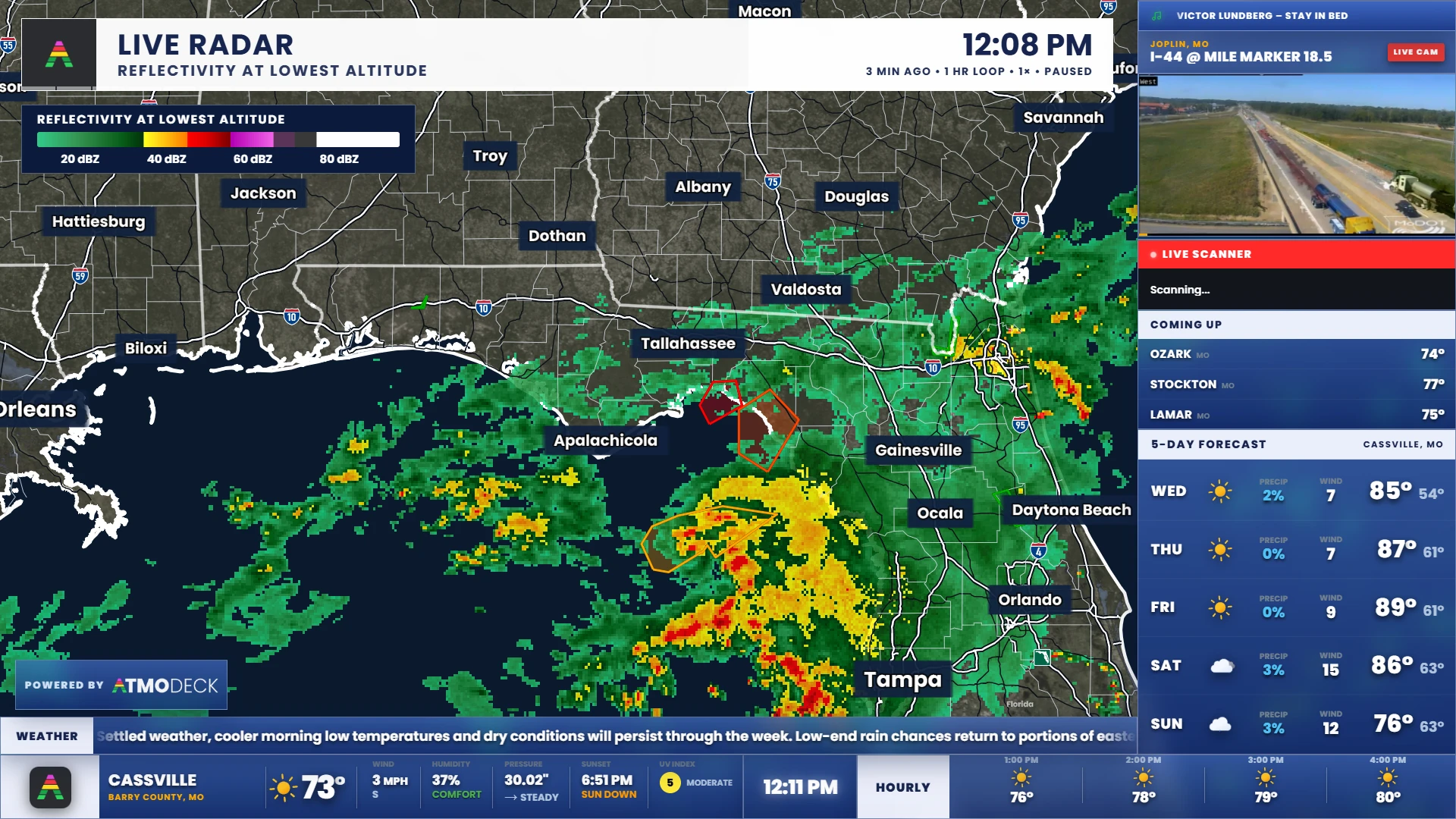
A radar you can put on air.
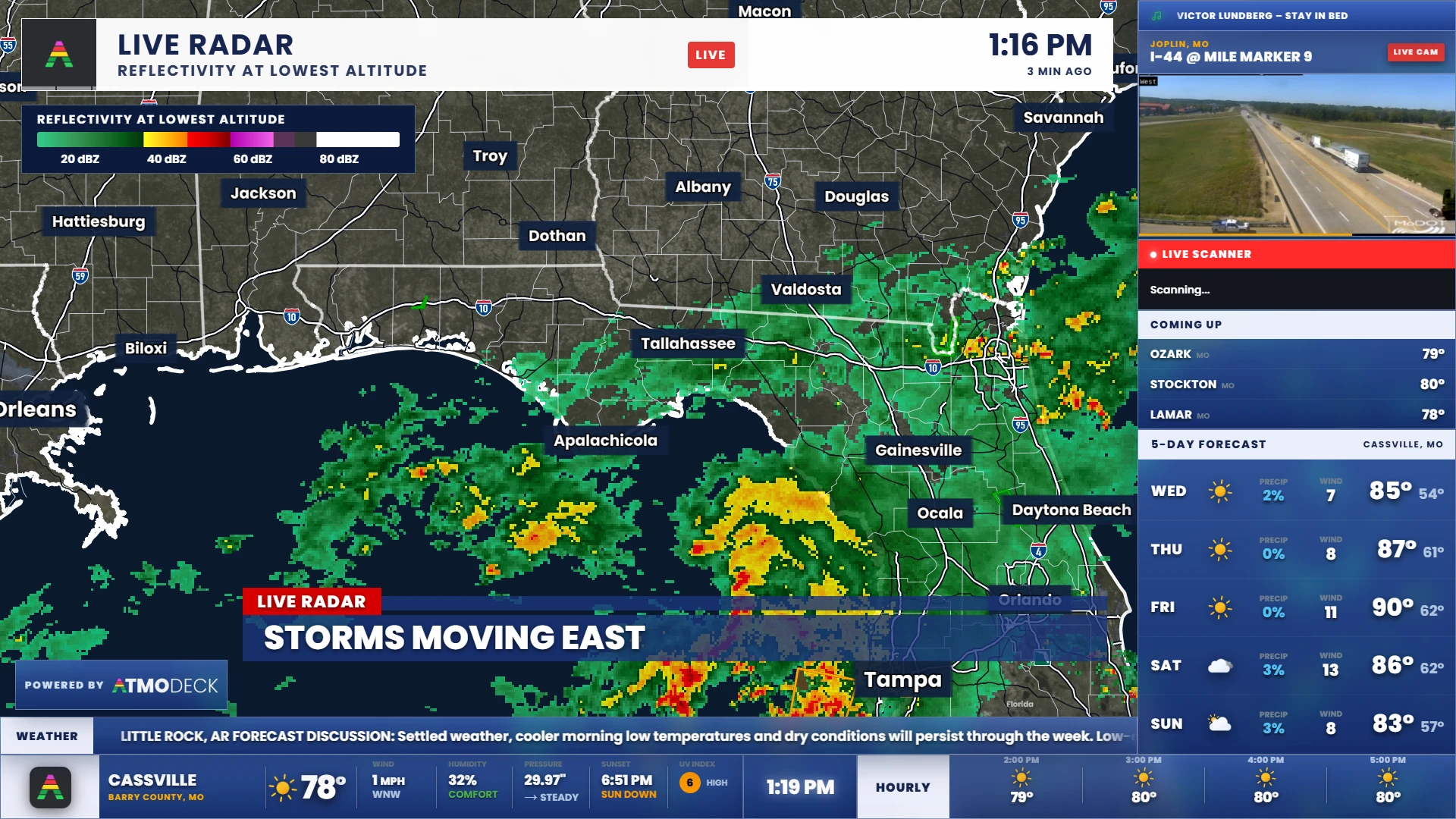
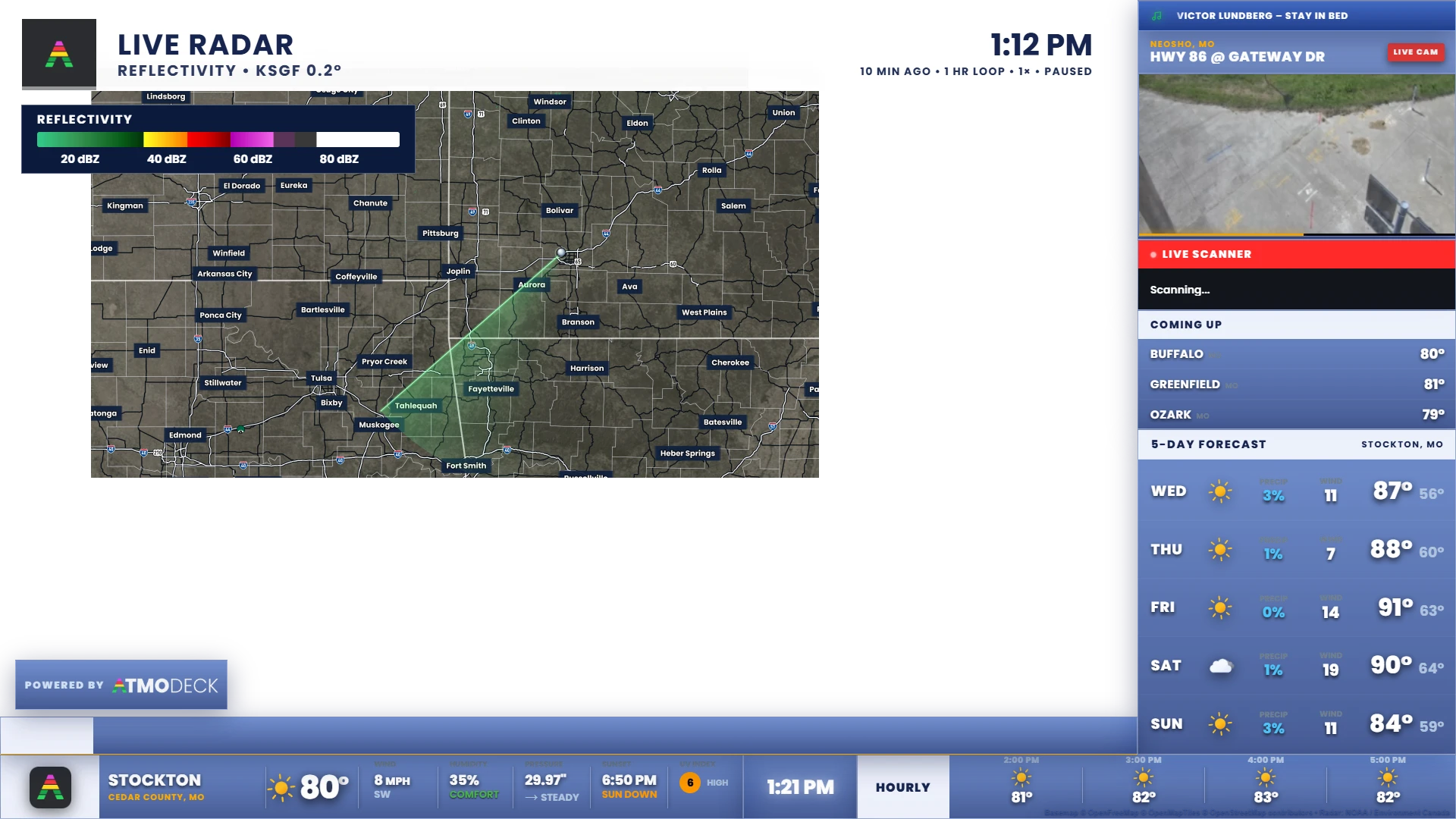
A full map behind your widgets, run from the Console. Live NEXRAD Level II from any radar, the national MRMS mosaic with 240 products, twelve weather models (including the RAP, the REFS ensemble and the free AI models) with every field of their newest run, satellite, storm cells that score and track themselves, storm tracks with arrival times, hurricanes, hazard outlooks, 3D volumes, and drawing tools.
- Right-click anywhere for a SHARPpy sounding, 45 HRRR mesoanalysis maps and a forecast slide in your slideshow's format
- Real-time sweeps that reveal as the beam turns
- Velocity, dual-pol, rotation markers and cleaned, dealiased data
- National maps, weather models, satellite loops, hurricane cones and outlooks
- Insight: every storm scored and followed, with its path, a cone for the next hour and a card when you click it
- A forecast builder: fronts, highs and lows from the Weather Prediction Center, moving the way the weather does, flat or in 3D
- Now, then the forecast: the radar or the temperature carries straight on into the model forecast
- Map slides and MP4 videos for the slideshow, hotkeys to cut to them, and a map that comes up by itself on a new warning
- A header, legend and storm arrival list dressed like the rest of your broadcast
- Archive mode: replay any storm since 1991 with its warnings, reports, tornado tracks, lightning and satellite
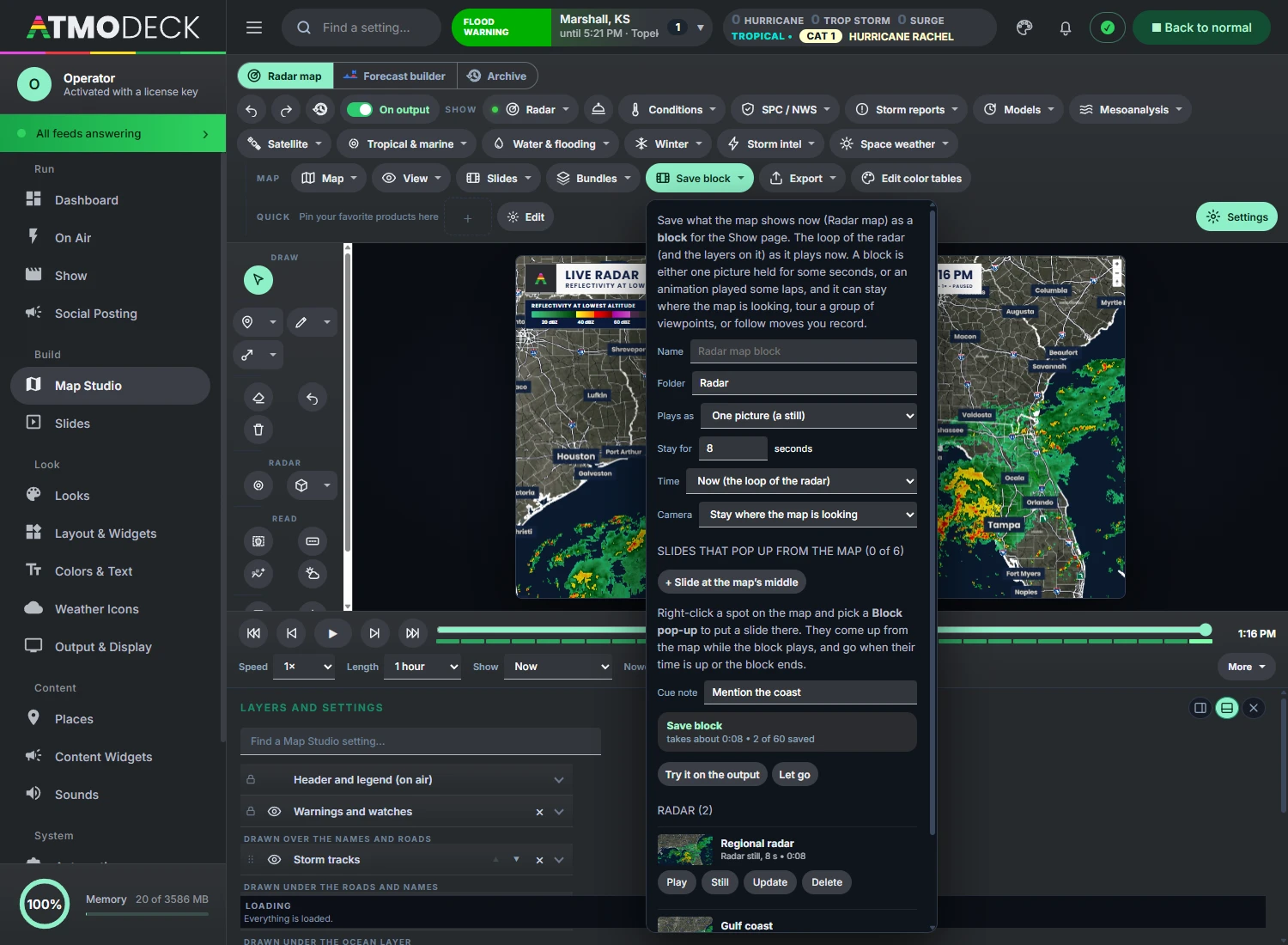
- Blocks: save the map as a still or an animation, then build a show of them on the Show page
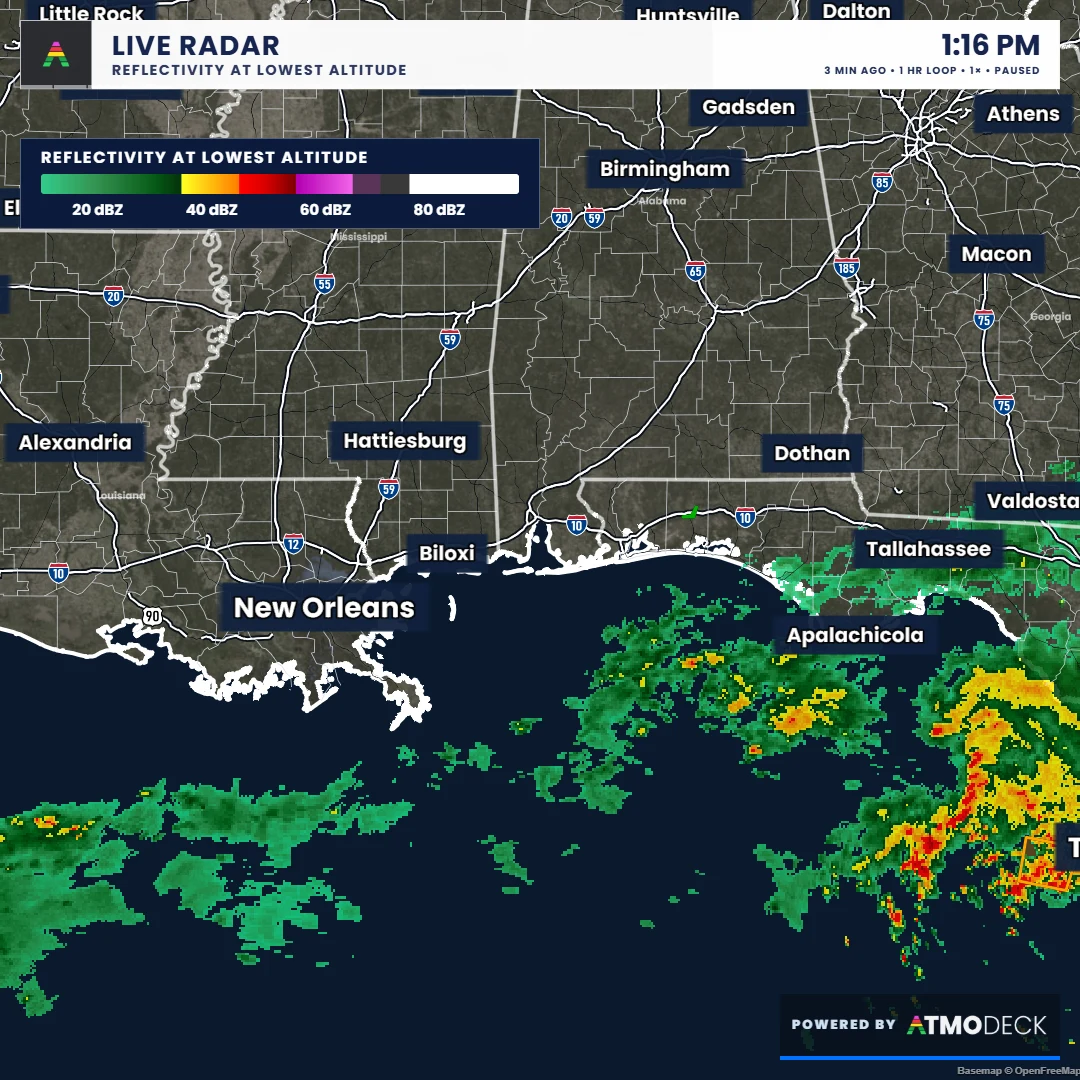
- Clean screenshots for social posts: the map, the header and the boxes you tick, as the output, square, 4:5 or 9:16
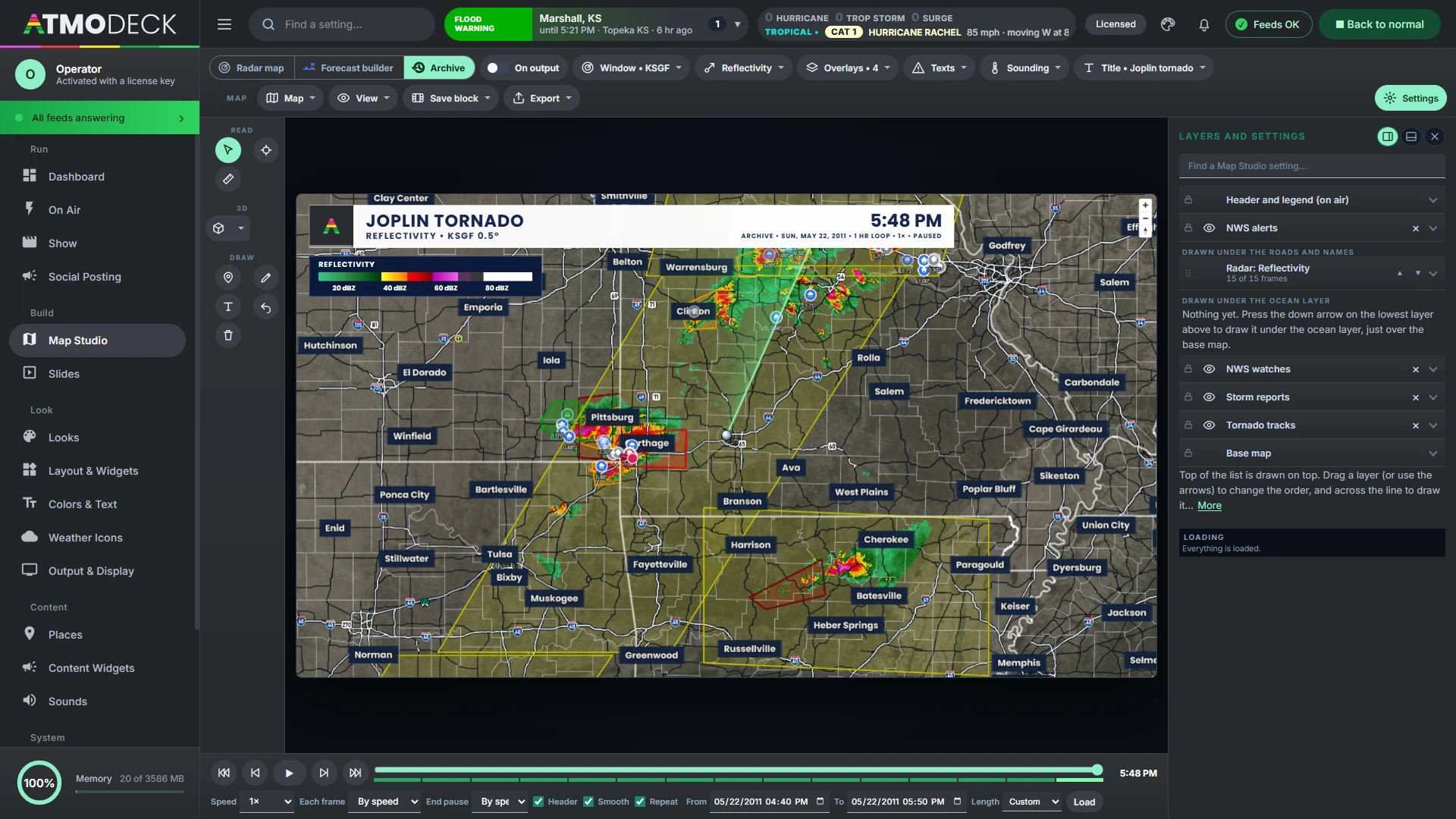
Replay a past event, with everything around it.
A third mode beside the Radar map and the Forecast builder. Pick a radar and a window of up to three days, any date back to 1991, and it plays the radar of the time with what was going on: warnings and watches as they were sent, mesoscale discussions, storm reports, NCEI Storm Events, damage surveys, every tornado track, airport observations, river gauges, lightning, satellite, the national mosaic and the SPC outlooks of the day.
- Texts reads any warning, watch or discussion in full; Sounding draws the weather balloon of the day
- 3D radar and a 3D satellite (cloud tops standing up at their height) from the archive
- A title for the header (“Joplin tornado”), with the date and its year
- Only what the archive holds is offered; the live map is never touched
One live weather deck. Pick the pieces you want on air.
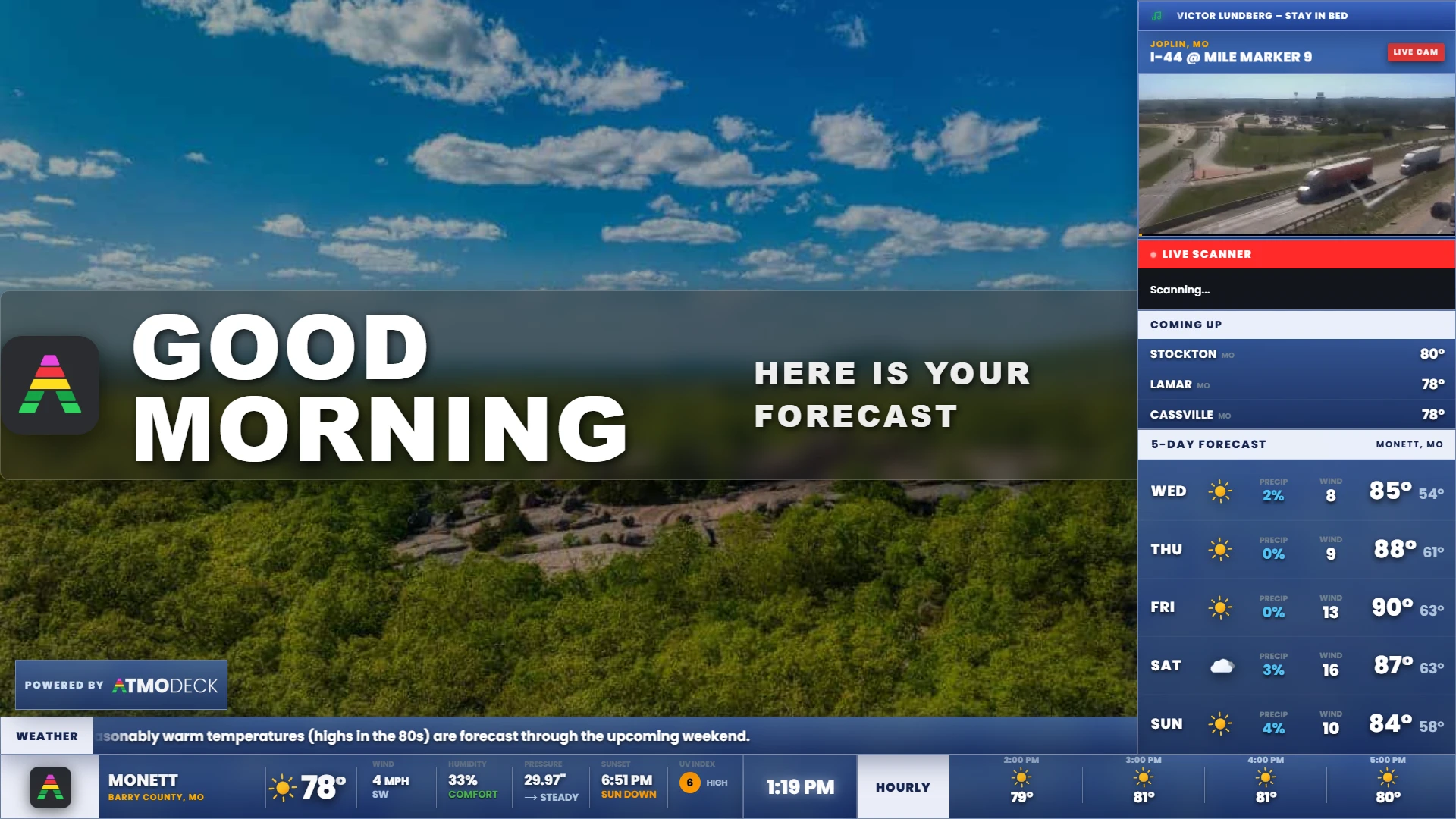
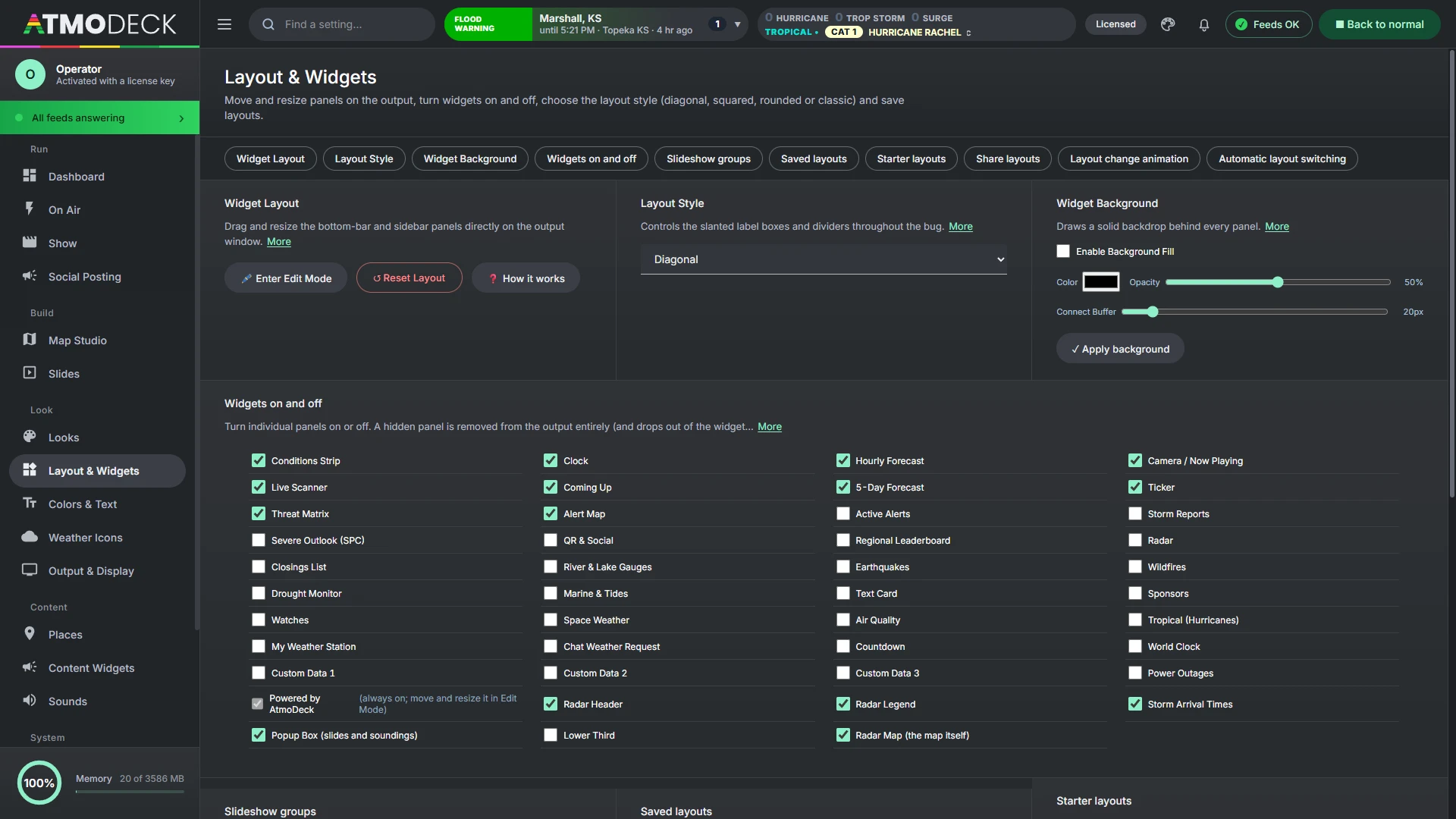
Every widget is independently draggable and resizable, and can be hidden (except the small Powered by badge, which stays on air, though you can still move and resize it; the Standard and Pro plans can switch it off). Resize a box and the content reflows without stretching; two sliders in each widget's right-click menu set how big the content and the title bar are. Widgets can be combined into a rotating slideshow group.
Core 8 widgets
- Conditions strip
- Hourly forecast
- Clock and date
- Ticker
- Camera and now playing
- Live scanner
- Coming Up (1 to 6 cities)
- 5-day forecast
Severe 8 widgets
- Threat matrix
- Active alerts
- Watches
- Storm reports
- SPC outlook
- Radar
- Tropical
- Alert map
Radar map 4 widgets
- Radar header (or your own)
- Radar legend
- Storm arrival times
- Popup box (slides and soundings)
Local and community 10 widgets
- Leaderboard
- River and lake gauges
- Marine and tides
- Air quality
- Space weather
- Earthquakes
- Wildfires
- Drought Monitor
- Power outages
- My weather station (Weather Underground, Tempest, Ecowitt)
Your content 12 widgets
- Text card
- Lower third (cycling titles, label and subtitle)
- Closings and delays
- Sponsors
- QR and social
- Chat weather request
- Countdown
- World clock
- Custom data 1, 2 and 3 (any JSON or RSS address)
- Powered by AtmoDeck badge
Also included
- Slideshow groups
- Starter layouts
- Automatic layout switching
- OBS scene switching
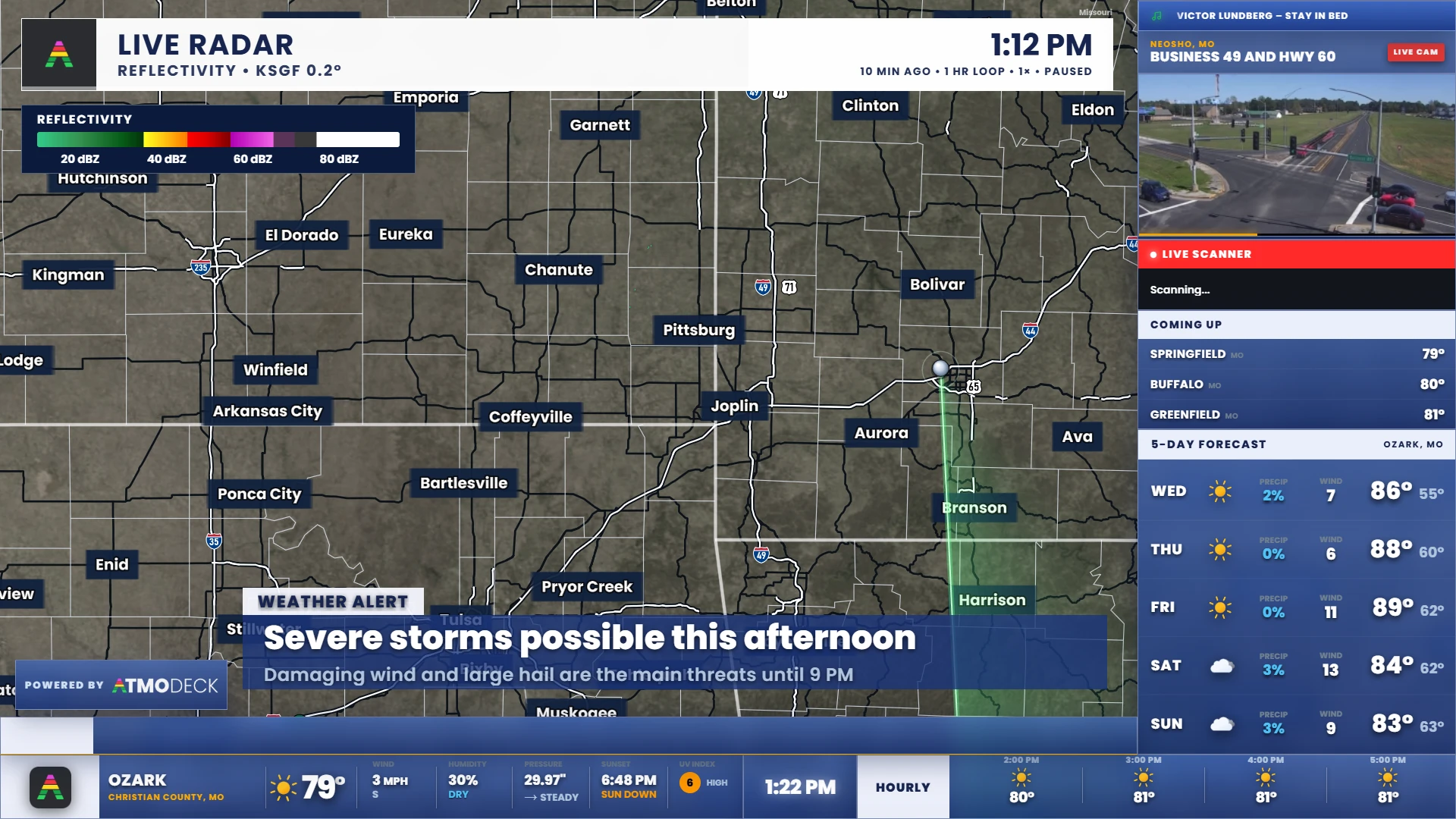
- Vertical 9:16 output
- Show editor with blocks
- Second output at the same time
- Archive mode
- As-run log
- Phone remote
- Storm-chaser mode
- Discord alerts
- US and Canada
- Spanish and metric units
- Output stream for OBS and vMix
- Six layout styles
- Looks: your whole styling in one click
- Weather icons of your own, animated too
- Keybinds
- On-air health lights
- Automatic backups
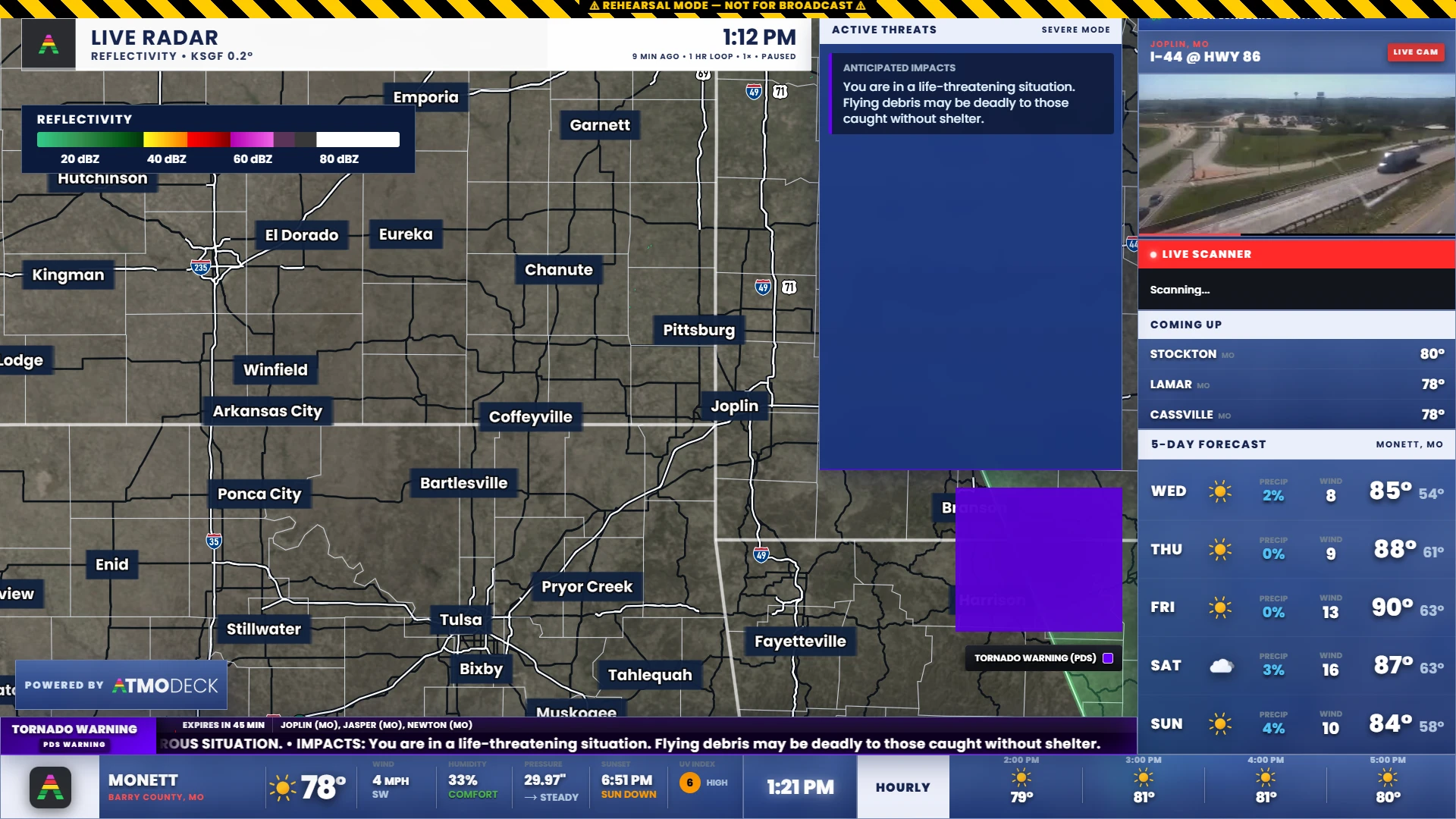
The graphics your viewers need, the moment a warning drops.
A tornado warning shouldn't wait on someone clicking through slides. AtmoDeck watches for active alerts in your area and switches the sidebar to the right threat matrix on its own.
- Tornado, severe, winter, flood and heat themes, each with its own threat matrix and alert map. The threat panel border takes the color of the threat on screen
- Alerts come from the National Weather Service in the US, filtered to your counties (optional NWWS-OI credentials give push-speed delivery), and from Environment and Climate Change Canada in Canada, filtered to your forecast zones
- Optional: the severe theme takes the color of the alert on air, so a tornado warning, a considerable severe thunderstorm warning and a plain warning each look different
- Hide the alert types you never want on air, set a color for each type, and save the colors and hidden types as an alert bundle you can switch in one click
- Rehearsal simulators fire realistic fake alerts, clearly marked, so you can practice without a real event
- Discord and webhook alerts post tornado and severe warnings with the counties, expiry, threats and storm motion, once each
- Alert sounds, and an alert mute you can switch from the Console or your phone
The Console's threat block
A live summary at the top of the Console: counts of tornado, severe thunderstorm and flood warnings, the day's highest SPC outlook with tornado, hail and wind chances, storm reports so far, and tomorrow's category. Switch it to flash flooding, winter, fire weather or heat and it shows those hazards instead.
Wildfires, their smoke and the drought, on the map.
A Fire, smoke & drought menu in Map Studio adds three layers from public services. There is no key to enter, and each one has its own legend and strength and lies in the stack of layers like the others.
Wildfires burning now
A dot for every wildfire from the National Interagency Fire Center, colored by how much is contained and sized by acres, with the mapped perimeters. Click a fire for its size, containment, county and the day it was found.
What the satellites see
Switch on the heat detections of the last day (NOAA) to see where the fire is burning hottest, and hide the small fires with a minimum size.
Wildfire smoke
The smoke NOAA’s analysts outline from the satellites, light, medium or heavy, drawn under the radar.
The Drought Monitor
This week’s U.S. Drought Monitor from D0 (abnormally dry) to D4 (exceptional), with the share of the country in each level, and the milder levels can be hidden.
Every earthquake, the shaking, and the tsunami bulletins, on the map.
An Earthquakes menu in Map Studio puts the U.S. Geological Survey’s earthquakes on the map, with no key to enter. Choose the window, the smallest magnitude, and the whole world or only what the map shows.
Sized by magnitude, colored by depth
A circle for each earthquake, sized by its magnitude and colored by depth, age or magnitude, with a ring on the newest and a ring in the color of the USGS PAGER alert.
Labels that can be read
Write the magnitude, and the place, beside the earthquakes you choose, with a size control that makes them as big as the picture needs. They lie over the map’s own names.
ShakeMap
Lines of equal shaking, from the Modified Mercalli scale, for the strongest recent earthquakes: how hard the ground moved, and how far.
Tsunami bulletins
The messages of the NOAA tsunami warning centers at the earthquake, in the color of the threat, with the magnitude and the center’s own words one click away.
Plates and faults
The tectonic plate boundaries of the world, and the active faults of the United States, colored by how fast they slip, when you zoom in.
Click for the card
Magnitude, place, time, depth, how many felt it and the alert, for any earthquake on the map.
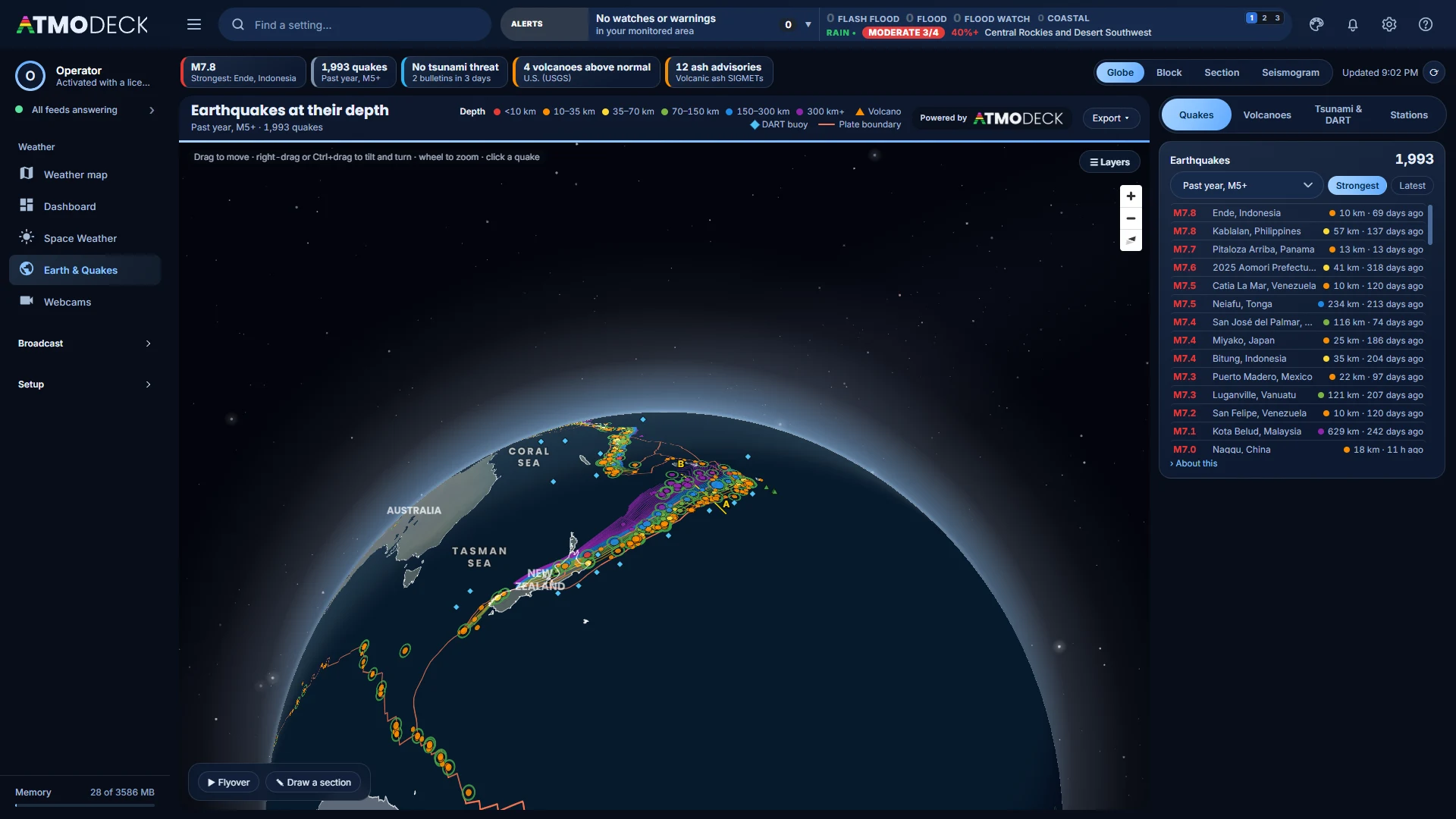
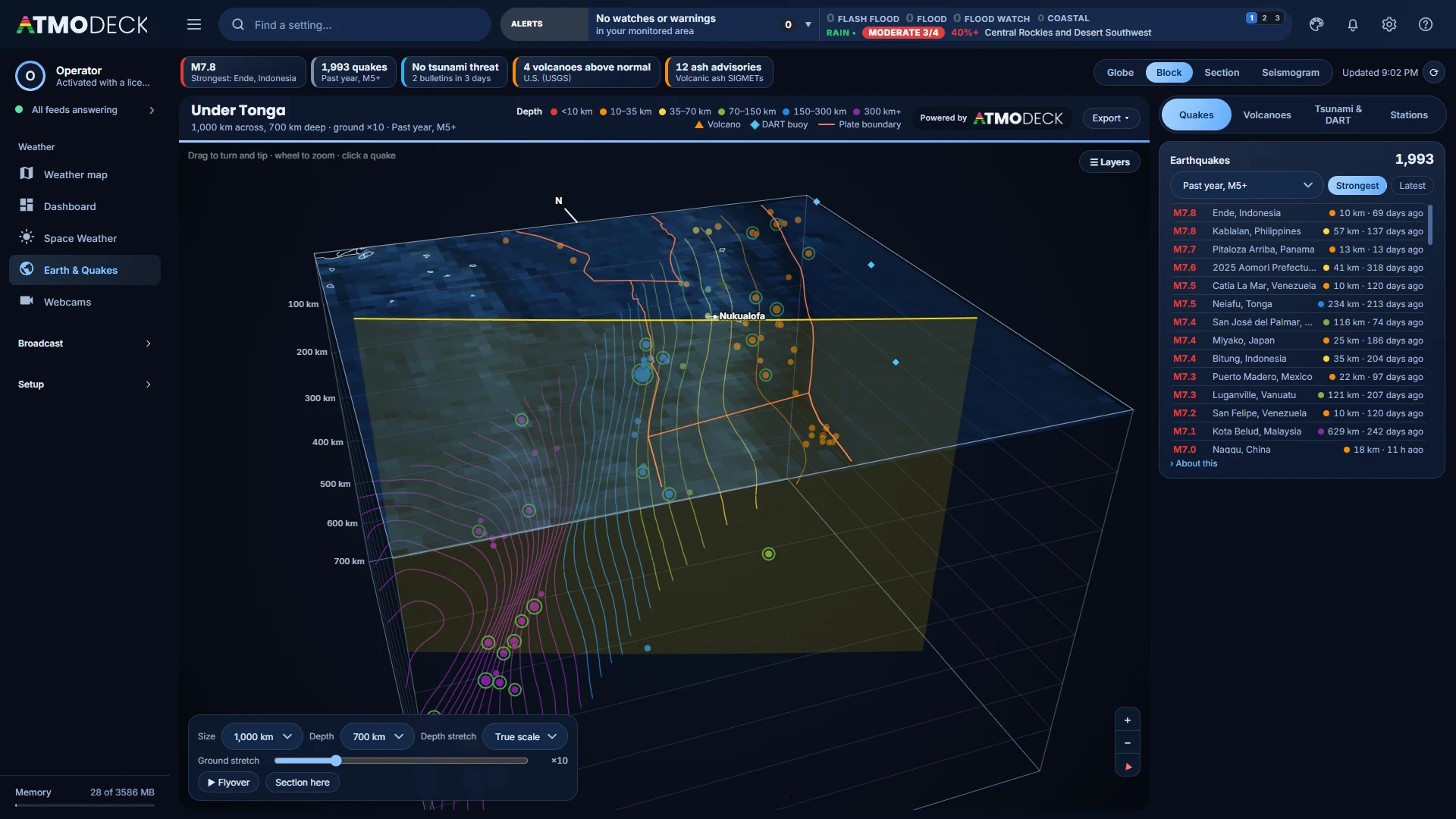
The Earth in 3D, with every quake at its depth.
A page of its own under Weather, after Space Weather. It is Map Studio’s own globe with the earthquakes from the U.S. Geological Survey placed at their depths, over the slabs of the plates sinking under the ocean floor.
- A block view lifts a piece of the crust out, so the slab and its quakes are seen from the side
- A cross-section along any line you draw, and a flyover through it to export as a video
- A quake’s card has its ShakeMap, Did You Feel It?, PAGER and the USGS aftershock forecast
- Right-click the globe to survey an area: its quakes now and since 1900, the nearest fault and plate boundary, and the rock there
- Layers for the geologic map, volcanoes and their ash, and the DART tsunami buoys
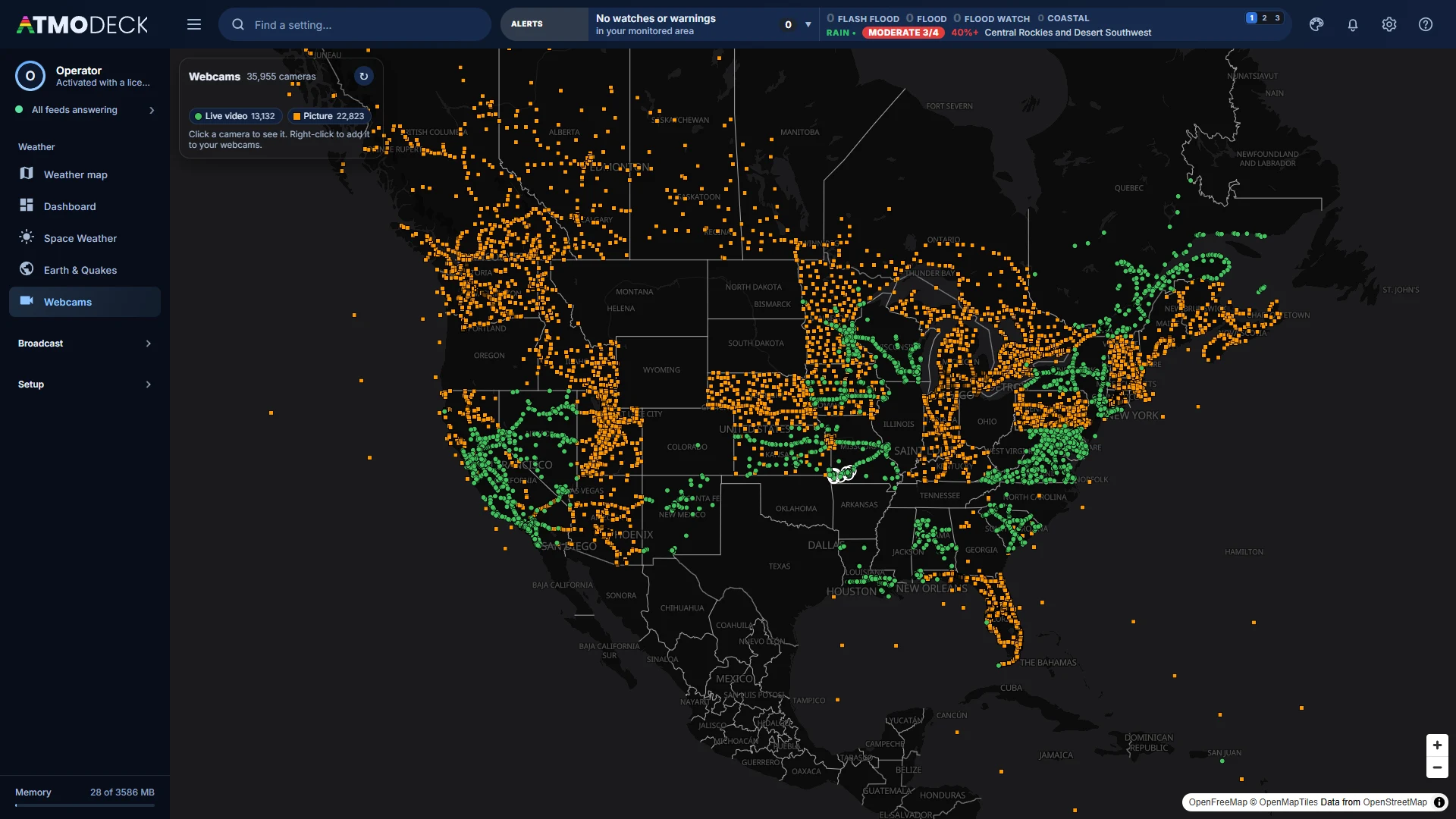
Every camera AtmoDeck can find, on one map.
The Webcams page finds the public cameras by itself and puts them on a map, so the view down the road from a storm is a click away.
- State DOT and 511 traffic cameras across the US and Canada
- National Park Service webcams and USGS river cameras
- Creative Commons YouTube live streams, the kind that can be rebroadcast on air
- Live video and Picture in the key turn each kind on and off
- Add a camera to your webcams, or show it live on the Output with its name and place in the top left
The Sun, the aurora and the solar system, on a page of their own.
The NOAA scales, Kp, the solar wind and the X-rays along the top, and four views below them. Every view exports as a photo, a video or a GIF: the map plays through its timeline, the solar system through its two years, and the Sun and the Earth turn.
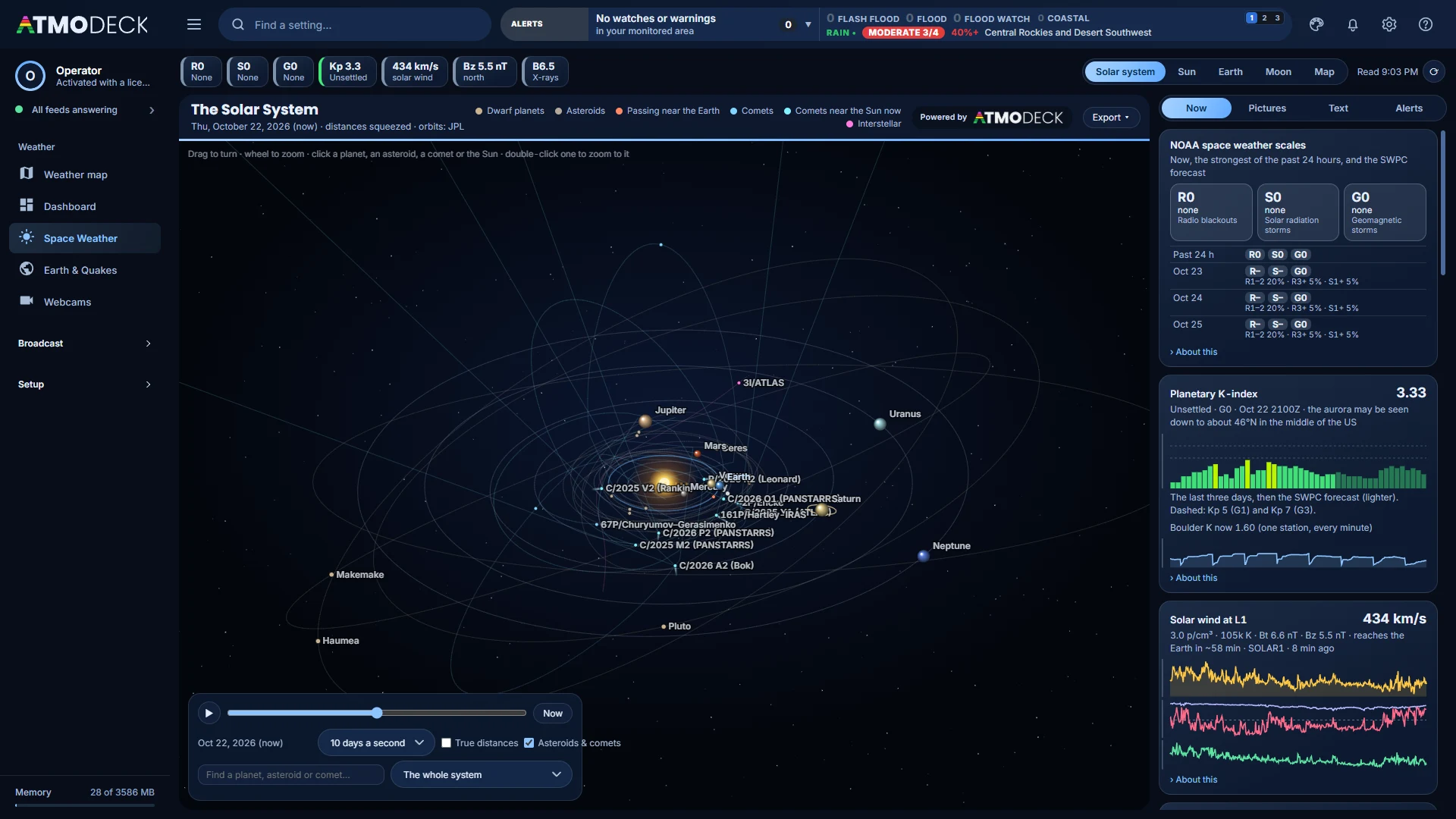
The solar system
The planets, with Ceres, Pluto, Vesta, Bennu, Halley, 3I/ATLAS and more from JPL, and the asteroids passing nearest the Earth in the next 60 days.
The Sun
Today’s SUVI picture on a globe you drag to turn, with SDO and SOHO, and the far side the Earth cannot see shown grey and striped.
The Earth
A live picture of the whole world from the full disks of GOES-19, GOES-18, Himawari, Meteosat-12 and Meteosat-9, with city lights at night.
The map
Flat or a globe, with a timeline: the aurora forecast as a smooth band, HF radio absorption, the ionosphere, the geoelectric field and the ICAO advisories.
The Moon has a view of its own, and every view has a header in your look.
Chase it. AtmoDeck follows you.
Your phone controls the radar on your broadcast. Tap Follow my location and the radar re-centers on you with a pulsing YOU marker, a trail of where you have driven, and the warnings around you, in the US, in Canada, and across the border.
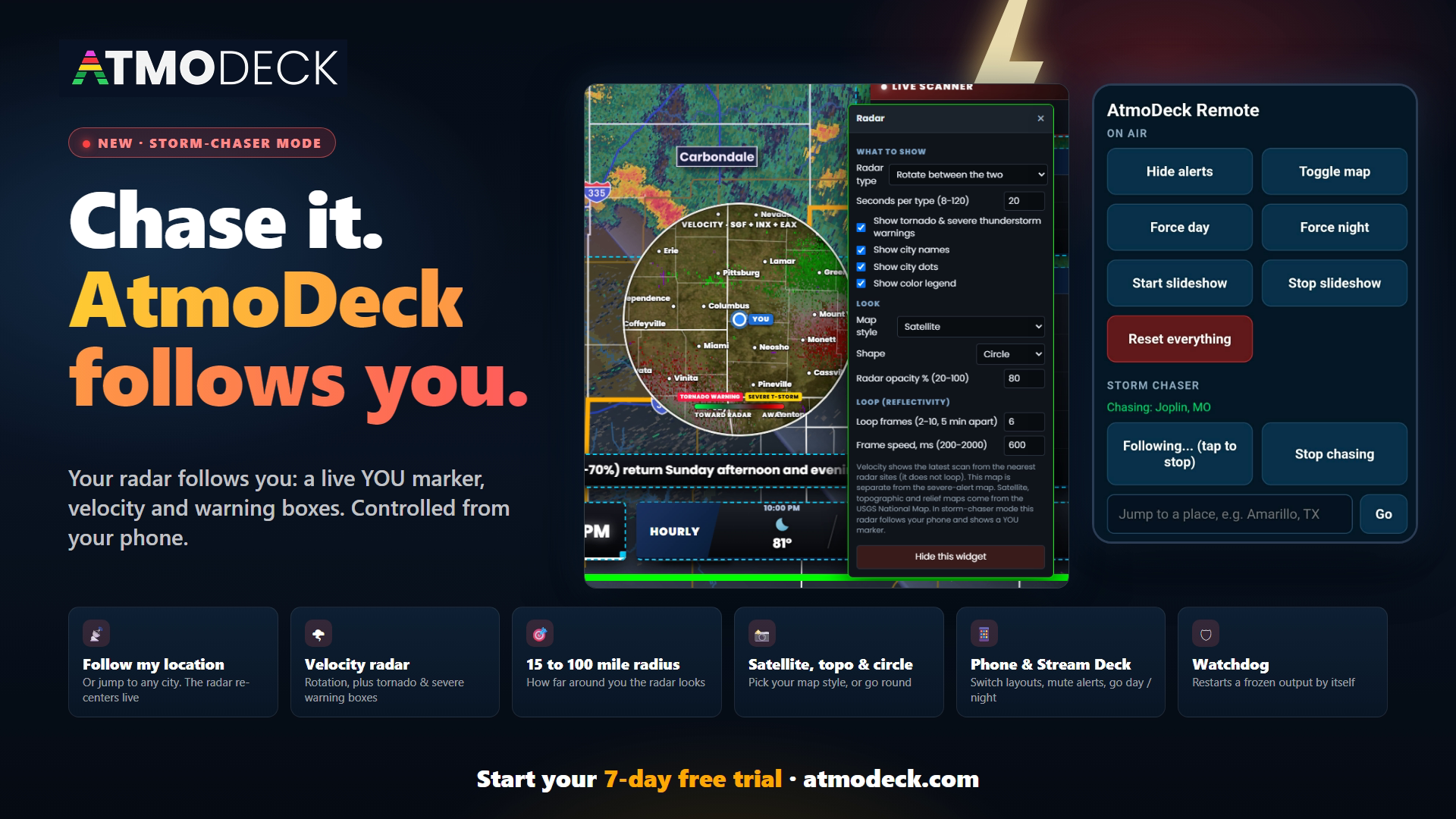
- The Radar follows you with a YOU marker and a breadcrumb trail. By default your alerts, threat matrix and forecast towns stay on your normal area
- Tornado and severe thunderstorm warning boxes for wherever you are, even outside your saved counties, each with a storm motion arrow
- Inside a warning? The radar shows a notice ("YOU ARE IN A TORNADO WARNING", the end time and the storm motion) and its border turns the color of that alert type
- On your phone: a big alert box (with a vibration) when you are in a warning, otherwise the nearest warning with its distance, direction, motion and end time
- Optional: use my GPS town for everything, so the Conditions strip, alerts and threat panel follow you
- Works over your Wi-Fi, a phone hotspot in the vehicle, or a free private network like Tailscale. Your location goes from your phone to your own PC, never to us, and is not saved
Build a whole broadcast like a TV rundown.
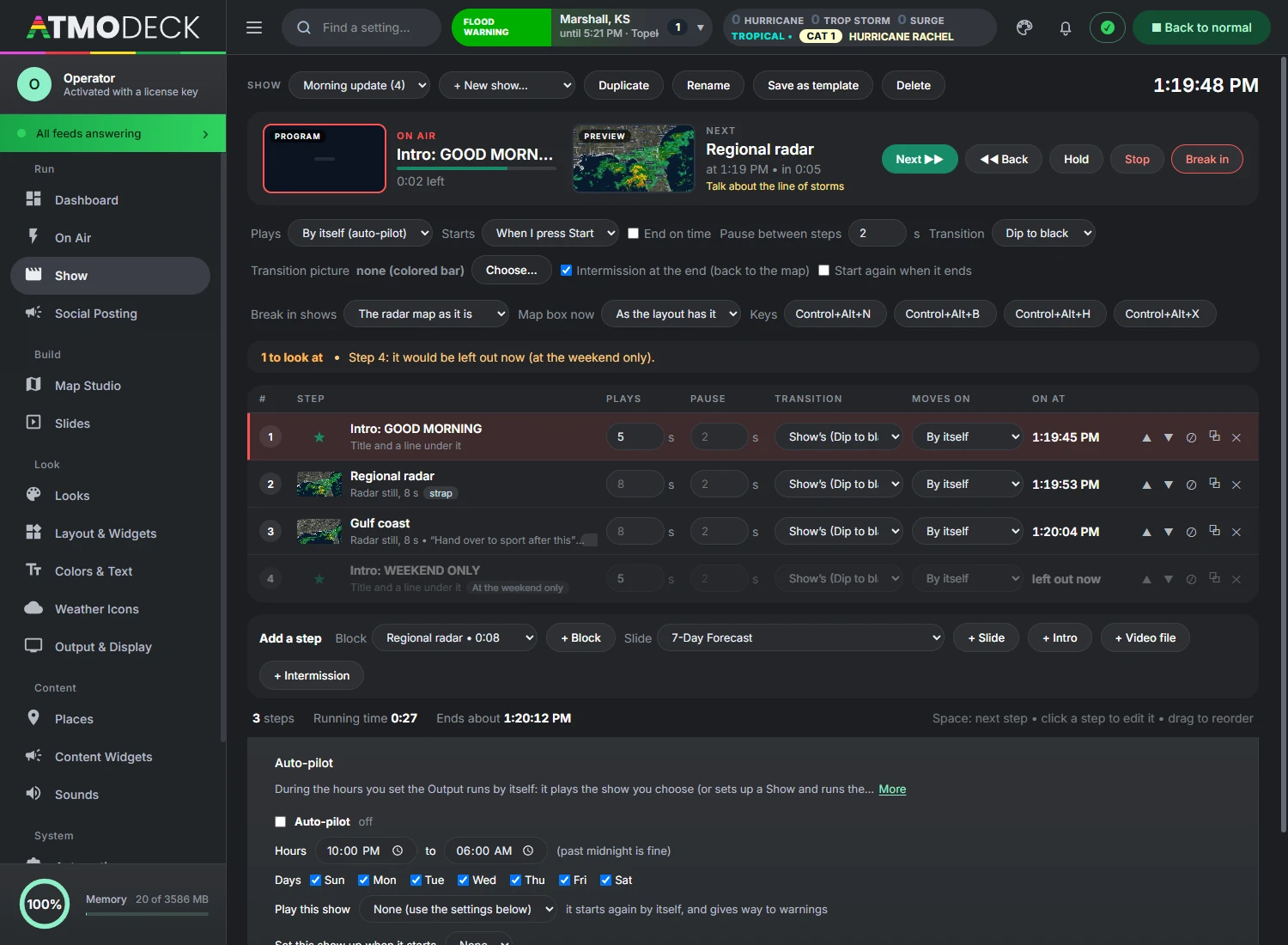
Save what the map shows as blocks (a still, or an animation, from where the map is looking or on a tour), put them in order with your slides, intros and an intermission on the Show page, and play it by the clock or one step at a time. It reads like the rundown of a broadcast switcher: the time each step takes, the time of day it will play, the pause after it and the way it comes in.
Blocks from every mode
The Radar map, the Forecast builder and Archive mode each have a Save block menu. A block is one picture held for some seconds, or an animation played some laps with a pause on its last picture. The radar can be Now, Now carried on into the forecast, or the forecast, at the speed you choose.
Tours with laps at every stop
Stay where the map is looking, or tour a group of viewpoints. On a tour each stop can play its own laps of the loop, and the map does not fly on until they are done.
Slides, intros, intermissions
Every slide of the slideshow can be a step. An intro takes a title and a line of your own words. An intermission lets everything go and the Output goes back to the radar map, and a show can end with one.
Transitions between steps
Cut, dip to black, wipe, push up or iris, set for the whole show and changed for any step, with a pause held after each step that you set for the show or for one step.
Auto-pilot or a key
Play it now, or arm it for a time of day, or let auto-pilot run it by the hours and give way to a warning. Or move step by step with Space, or keys that work while OBS has the focus. The phone has Next, Back and Hold. Rehearse runs the clock without touching the Output.
Times you can trust
The show’s running time, when it ends, and the clock time of every step, kept true while it runs: a step that runs long moves everything after it. Cue notes sit under each step for the presenter.
A check before you go on
The page lists what would go wrong on air before it does: a block that was deleted, a tour whose viewpoints are gone, an intermission that would stop a show playing by itself, a show that runs past its slot. Click a line to open that step.
End on time
Give a show an end time and it lands on it: steps you marked optional are left out, the last first, and the pauses are shortened or lengthened. It is worked out again at every step, so a step that ran long is made up.
Steps that know the weather
A step can play only while a warning is in effect, only when it is raining at your place, on weekdays, at the weekend, in the morning or after noon. One whose condition is not met is left out, and the times close up.
Break in, and back
One press cuts the Output to a block you chose, or to the radar map as it is, and holds the show. Press again and the show goes back to the step that was interrupted. It is a button, the B key, a key that works anywhere, and a button on the phone.
Program and Preview
A picture of the block that is on and of the one that is next, with their cue notes, like the two monitors of a switcher. Every block keeps a small picture of the map when it is saved.
Title straps and map boxes
A step can put a title strap on the Lower Third for as long as it plays, and move the radar map into a box for that step: the left, the right, or a corner over a slide. The layout is back when the show lets go.
Shows by the clock
A Schedule of up to 24 time slots, each a show, a time from and to and the days it plays. Each show starts when its slot begins and plays again from the top until the slot is over.
Ready-made shows and templates
Start from Morning, Afternoon, Evening or Severe weather, built from the blocks and slides you already have, or save any show as a template of your own.
Click a step to go to it
The number of every step is a button: while the show runs it cuts straight to that step, and when the show is not running it starts there.
A voice for each step
Choose for every step whether the Voice reads it aloud, stays silent, or does as the Voice page says. Warnings are always read.
Stinger transitions
Play your own video with transparency between steps, or choose one of six ready-made animations that wear your colors and logo: bars, slash, rings, tiles, curtain and wave.
A picture of its own for breaking in
Give the Break in button a picture that slides across as the show is cut, separate from the picture of the transitions between steps.
Graphics that fill the Show widget
A graphic in a show fills the space of the Show widget, and a right-click on the widget chooses whether its background covers the whole screen or only the widget.
Radar blocks ready before their turn
The radar of the next block, one site or several, is downloaded while the step before is on air, so it comes up with its loop already in.
Record the camera by hand
Press Record, pan, zoom and tilt the map the way the block should move, and press Stop. The Output repeats your moves, at the speed you made them.
A report when it ends
What played, when, and for how long against the plan, with what was left out and every break-in, to copy or save. The phone remote has a presenter’s page with what is on, what is next, the cue and a countdown.
Every watch and warning, on your social pages, the moment it is issued.
AtmoDeck posts each new watch and warning to X, Bluesky, Mastodon, Facebook pages, Telegram, Discord, Slack and Microsoft Teams with a picture of the area: the county map, your counties picked out, the alert’s own shape, your logo and, if you like, the live radar. It writes the words from what the Weather Service says, and you decide whether each post waits for your click first.
Connect X in one click
Press Connect X, approve AtmoDeck on X’s own page, and your alerts post to your own account. No keys to make, no passwords typed into AtmoDeck, and it is included with your plan.
You stay in charge
Off until you switch it on. Every post can wait in a queue where you change the words, look at the picture and approve or throw it away. It never posts what was already in effect when AtmoDeck opened, never posts an alert twice, and keeps to a limit of posts an hour you set.
Updates are comments, not new posts
When an alert is updated, AtmoDeck adds a short comment under the first post, and only if something real changed: a new end time, a stronger threat, more counties. The same facts sent again make no noise, so your page never fills up.
Your logo, your radar
Put your logo on every picture (with a transparent background if you like) and show the live NEXRAD radar under the alert. What a post looks like shows it as you set it, before anything goes out.
Quick Take videos
A five-second video of the alert over the radar of the last fifty minutes, made in seconds. Post one by hand, or have every tornado warning go out as a video where the service can take one.
Tropical storms
When the National Hurricane Center starts following a storm, one post goes out with its own cone picture, and each advisory is a short comment under it when something real changed. Choose the oceans and pause any storm.
Extra-urgent alerts
A tornado emergency, a PDS tornado warning or a flash flood emergency, as the Weather Service itself marks them, gets its name in capitals, the order to take shelter and a frame round the picture, and goes out at once without waiting for a click.
Team approval
Producers approve waiting posts from their own computer or phone with a private link: no account to make, change the words, approve or reject. Your connected accounts never leave the AtmoDeck computer.
Write your own post
Type your own words and add an alert, a Quick Take, one of your slides, or a picture or video from your computer. Tick where it goes and it posts at once.
Words that fit every service
Plain, urgent or friendly, with your counties first, the end time in your time zone, the hail, wind and tornado details, and what to do. Cut to fit each service’s limit, with your hashtags added.
Kept safe
Passwords and tokens are stored encrypted with your computer’s own key, in the main program only. The page that shows your destinations only ever sees a masked version of them.
A voice that reads your show, and a script for the person on air.
Pick a voice, write how the reading begins and ends, and choose what is read aloud: the slideshow and every new alert. For the person on camera, a teleprompter writes itself from the live warnings and weather.
One simple page
Pick a voice, write an opening and a closing, and tick what is read. The speed, the volume and the language are folded away until you want them.
Natural voices, free
Add a voice that sounds like a person with one click: women and men in US and British English, Spanish and French. It works with no internet and sends nothing anywhere. Nothing is downloaded until you ask.
The slideshow, read aloud
Choose the morning, afternoon and evening playlists and the slides to read: current conditions, today and tonight, the 3-day, 7-day and weekend forecasts, the day planner, live advisories. Your opening comes before the first slide and your closing after the last.
Alerts in plain words
Each new alert is read in the same plain words as the social post for it, friendly or urgent, and you choose which kinds: tornado, severe thunderstorm, flood, marine, watches. A warning is never cut off by a slide.
Friendly or urgent
Slides can sound friendly while warnings sound urgent. Each has its own choice.
Cloud voices if you want them
Bring your own Azure or OpenAI key for the most natural voices. The key stays on your computer, encrypted, and a voice of the computer takes over if the service cannot be reached.
A teleprompter that writes itself
Big words that scroll by themselves, written from the live warnings and weather, in English, Spanish or French, as sentences or talking points. It changes when the weather does.
Your own lines, anywhere
Add a sponsor read or a reminder one line at a time, and move any line, or any block, to where you want it in the script.
A pop-out on another screen
Show the prompter over the Console or in a window of its own on the screen you choose, full screen if you like. Start it from the Show page, or from a tablet with the phone remote.
Music under the broadcast, that knows when to be quiet.
Add your own tracks and they play on the Output under the slideshow and the shows. When your recorded forecast video starts, the music fades down by itself, and when it ends the music fades back in.
Playlists on a schedule
Put your tracks in playlists, then choose which one plays when: days of the week and a from and to time, even across midnight. AtmoDeck changes playlists by itself.
Ducks for video, voice and alarms
The music lowers for a video with sound, a voice reading or an alarm, then returns. You choose how far, how fast and how long it waits.
Ten-band equalizer
Shape the music from deep bass to treble, with presets and the live spectrum of what is playing drawn behind the sliders.
Listen to the Output
One button plays what the Output is playing on your own speakers or headphones, even when the Output sends it to a virtual cable.
Live level meters
A volume slider over left and right meters in decibels, a ducking gauge, and a line saying what is playing and where it goes.
Now Playing, from your music
The Now Playing widget shows the artist and title of the track that is playing, read from the file’s tags, and you can correct them on the track.
Choose where it comes out
Send the Output’s sound to the Windows default, a real device, or a virtual cable that OBS captures. Nowhere silences it all.
Everyone on the team, on the same setup, live, and talking.
Add the people of your team by email and every computer keeps the same AtmoDeck: layouts, looks, all of Map Studio, shows, places, the voice, the slideshow, even your uploaded sounds and photos. Change something on one computer and it is on the others a few seconds later.
Through the server, and nothing is kept
AtmoDeck’s server only passes the changes along to the teammates who are on line. It keeps no setup, no sound, no picture: only the team’s name and the email of each person.
A folder made for you
No Dropbox or Google folder to pick. AtmoDeck makes a folder called AtmoDeck Team in your Documents with the whole setup in it, and keeps that folder in step with your team through the server.
You choose who sends everything first
The first time a computer syncs, nothing moves until you say which way: this computer sends everything, or it takes the team’s setup after a backup.
The newer change wins
Two people change the same thing? In Live the newer change wins, and the other is kept in the backup. Different things never get in each other’s way.
Owner, editor, view only
The owner chooses what each person can do. A view only computer gets the whole setup and keeps it in step but never sends a change, so an intern can watch the on-air setup without being able to touch it.
Review before you send
Choose Review and the team’s changes still come in live, but yours wait on your computer. A list says what is different, part by part, and one button sends them to the team when you are happy.
Who changed what, with Undo
A timeline lists what was sent, received and undone, with the name of the computer. Every change taken from the team has an Undo that puts back what you had before.
A live chat for the desk
The Desk notes card on the Dashboard becomes a live chat with everyone on line, with names and avatars, and the bell tells you when a line comes in while you are elsewhere.
A page of its own
The Team page shows at a glance whether you are in step, who is on line, each team with its people and their roles, and what is kept in step part by part.
Pause when you need to
Pause syncing for 30 minutes, an hour, four hours or until you resume, while you rehearse or try something. Nothing leaves or arrives until you resume.
Keys and passwords stay home
Passwords, tokens, your license and everything that belongs to one computer (the output shape, the sound device, file paths) are never shared.
Drag it, resize it, rotate it. Right on the live output.
Every panel is independently movable, and any set of widgets can share one box and take turns. Build it once, save it, and switch between looks in a click.
- Free-form drag and resize with snapping, keyboard nudging, undo, and right-click options per widget
- Widgets overlap? Click again in the same place to pick the one behind
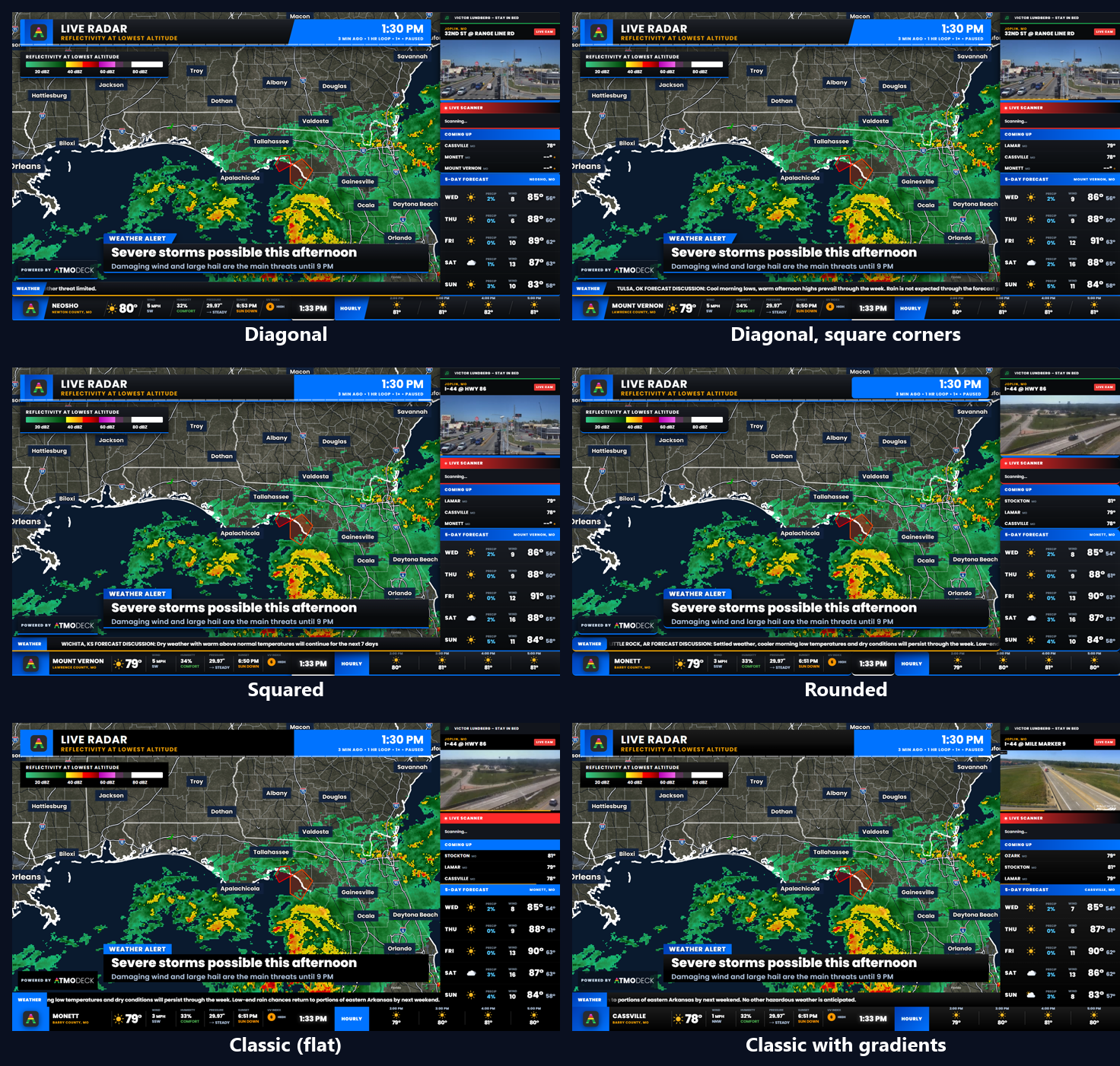
- Six layout styles (diagonal, diagonal with square corners, squared, rounded, classic solid and classic with gradients) that apply the moment you choose one
- Resize a box and the content reflows instead of stretching; content and title size sliders set how big everything is
- Slideshow groups rotate several widgets, including live camera slides, in the same box
- Saved layouts with keyboard shortcuts, plus starter layouts: Severe Weather, Storm Chaser, Daily Forecast, Sponsor Friendly, Weather Station and Minimal
- Export and import layouts as files; automatic layout switching when the alert theme changes
- The radar map is a widget too: move it and resize it with its 16:9 shape locked, and put other widgets round it
- Vertical 9:16 output for TikTok, Shorts and Reels, with its own layout, or both shapes at once with a second output
16:9 for the stream and 9:16 for social, at the same time.
Turn on a second on-air window in the other shape and AtmoDeck runs both at once. It has its own widget layout (the wide and vertical layouts are kept apart), so the vertical picture is arranged for a phone, not squeezed down from the wide one.
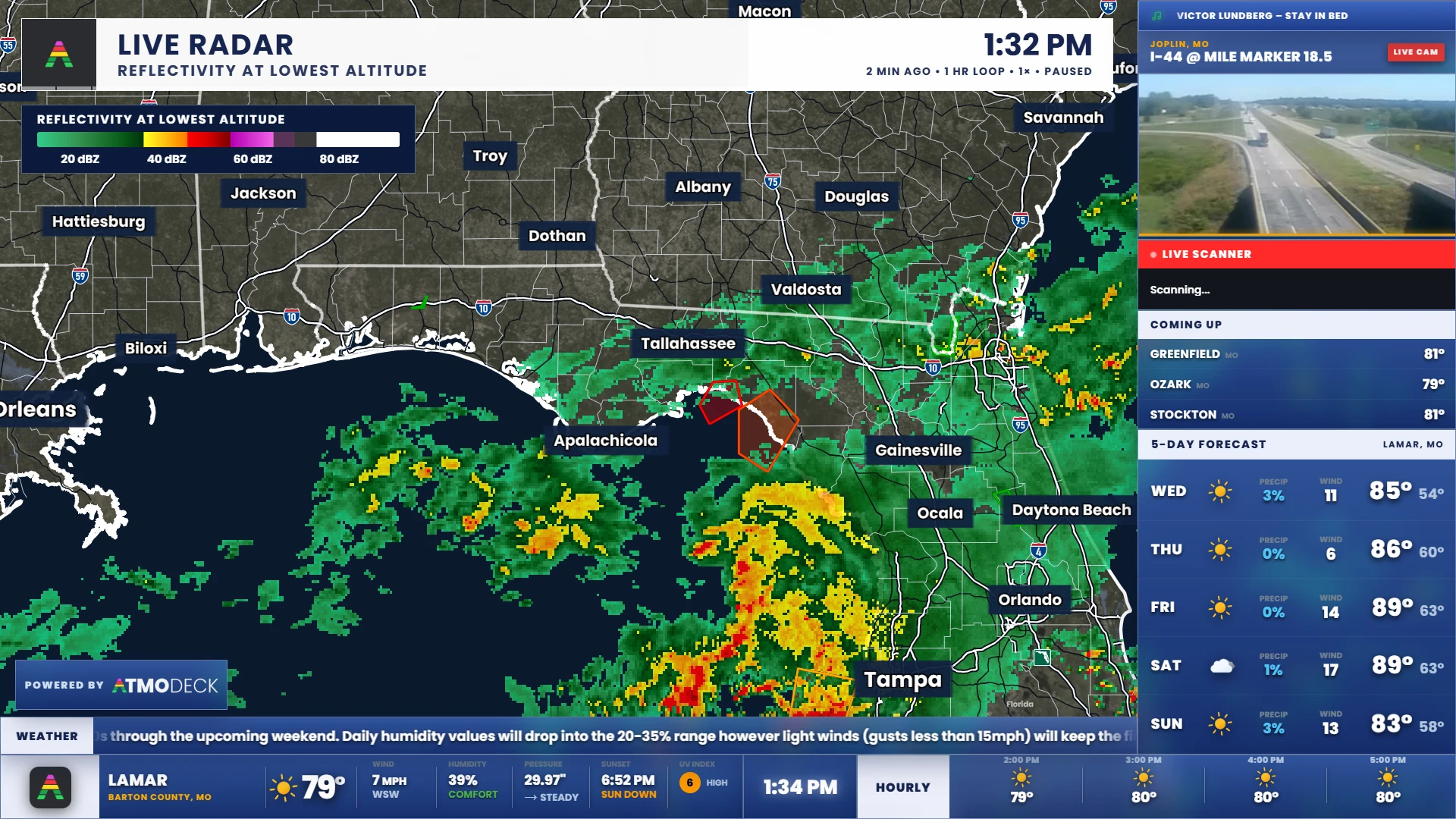
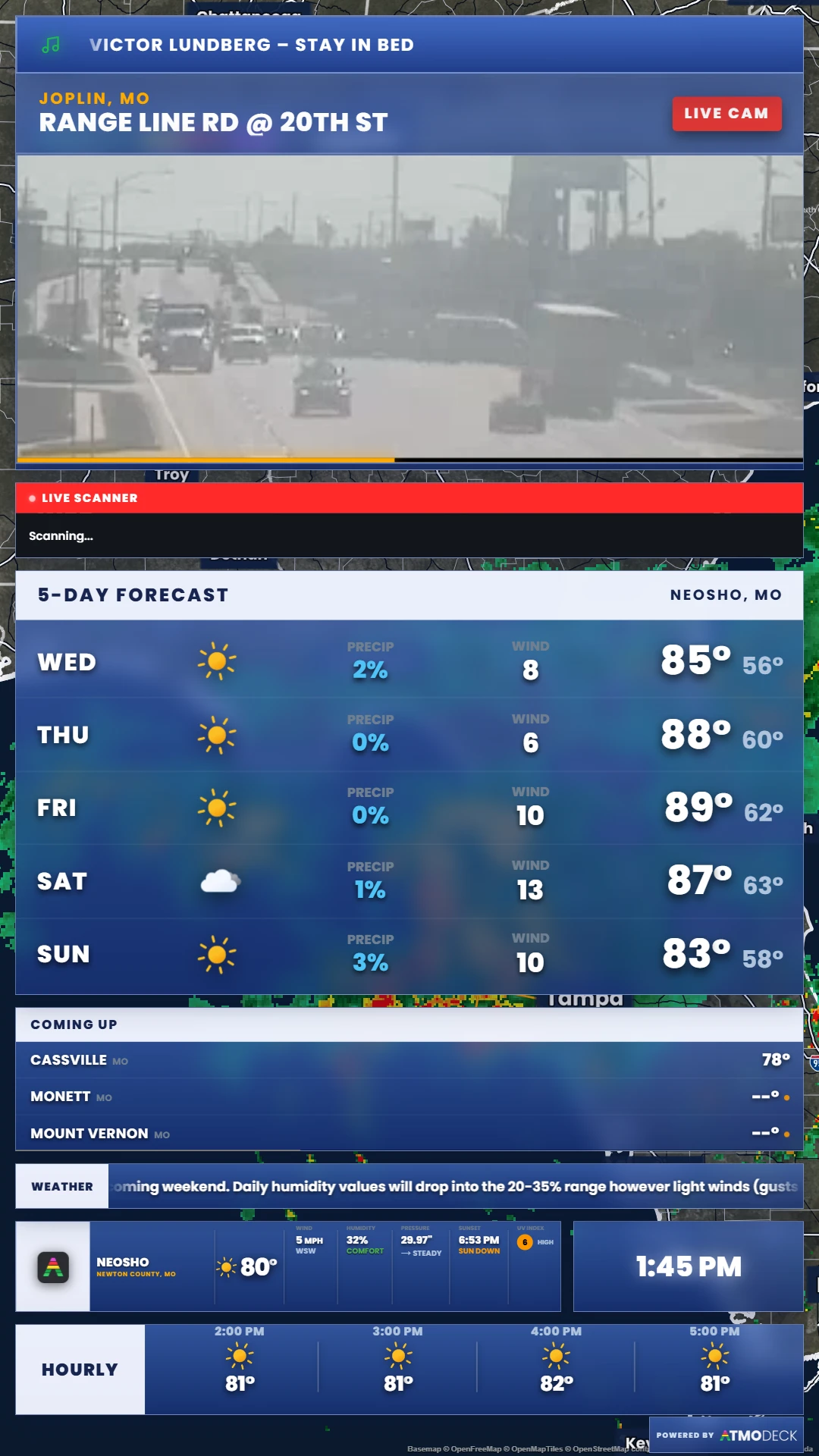
- Point a second OBS source at the window called “AtmoDeck Output 2”
- Its own layout: the Edit the second output’s layout button opens Edit Mode in that window only, and what you move there never touches the first output
- The map, the alerts, the settings and the lower third are shared; the slideshow runs in the wide window; the sound comes from the first output only
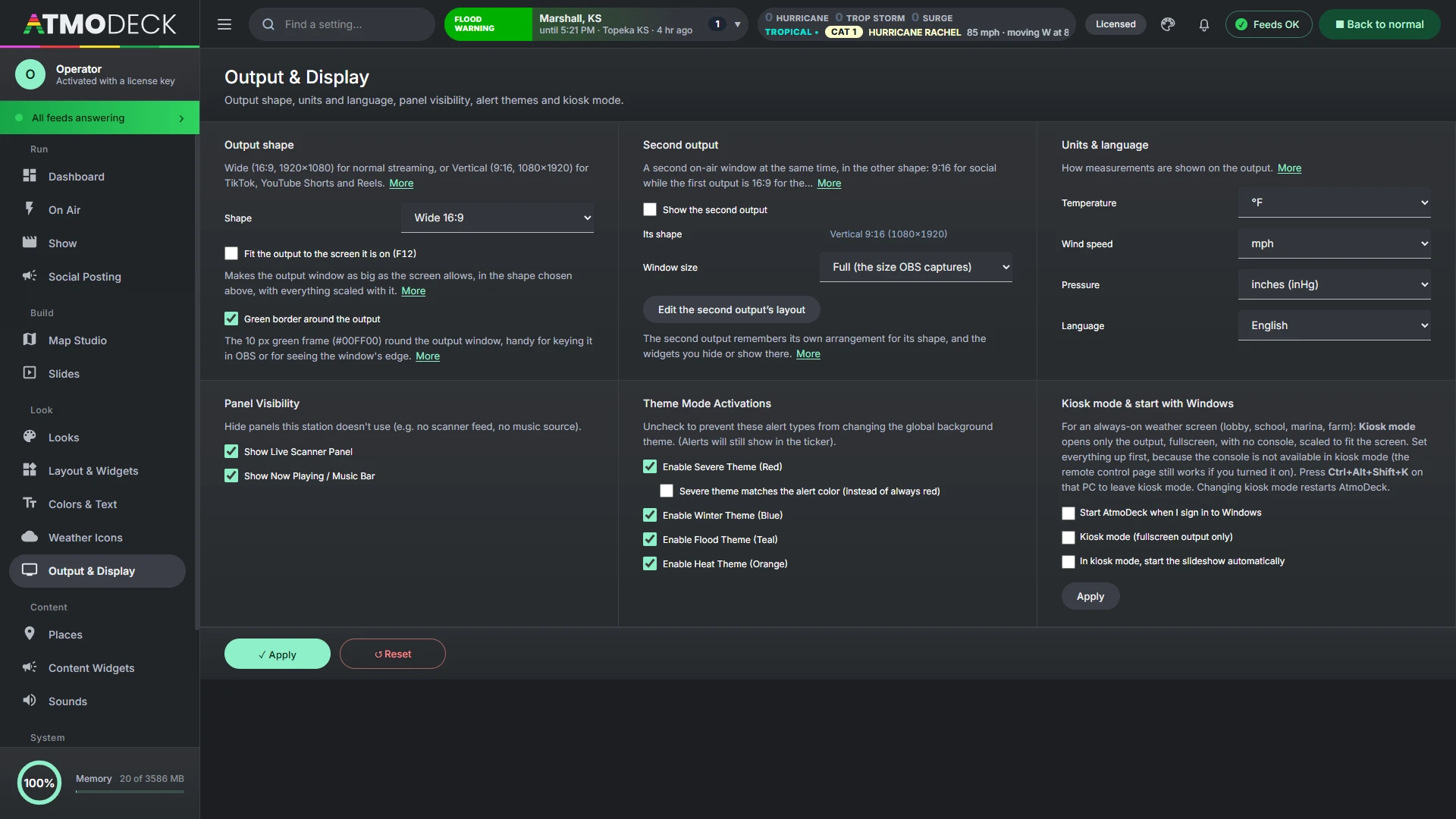
- Full size (what OBS captures), fitted to your screen, or half; it reopens with the app if it was on
- Make the first output Vertical and the second becomes the wide one
Brand it until it is unmistakably yours.
Header creator
Upload your own PNG for the radar header and place each element on it: title, product name, tagline, time, date, age, loop info, the LIVE badge and the timeline. It shows and hides the way the built-in header does (a warning takes over the title, LIVE shows on the newest frame). Combine the legend into it if you want one piece.
Colors and fonts
Four look presets, six theme palettes and seasonal theme packs, a separate logo for each theme, any Google Font, and six layout styles for panels, labels and dividers. Map colors, roads, borders and the box behind every city name are adjustable.
Day, night and sky
Themes follow sunrise and sunset, or you can force one. On the globe, edit the sky, horizon, haze and space colors, the stars, and the atmosphere glow; the sky shows blue by day and dark by night where the map is centered.
Titles that cycle, with breaking news that covers them.
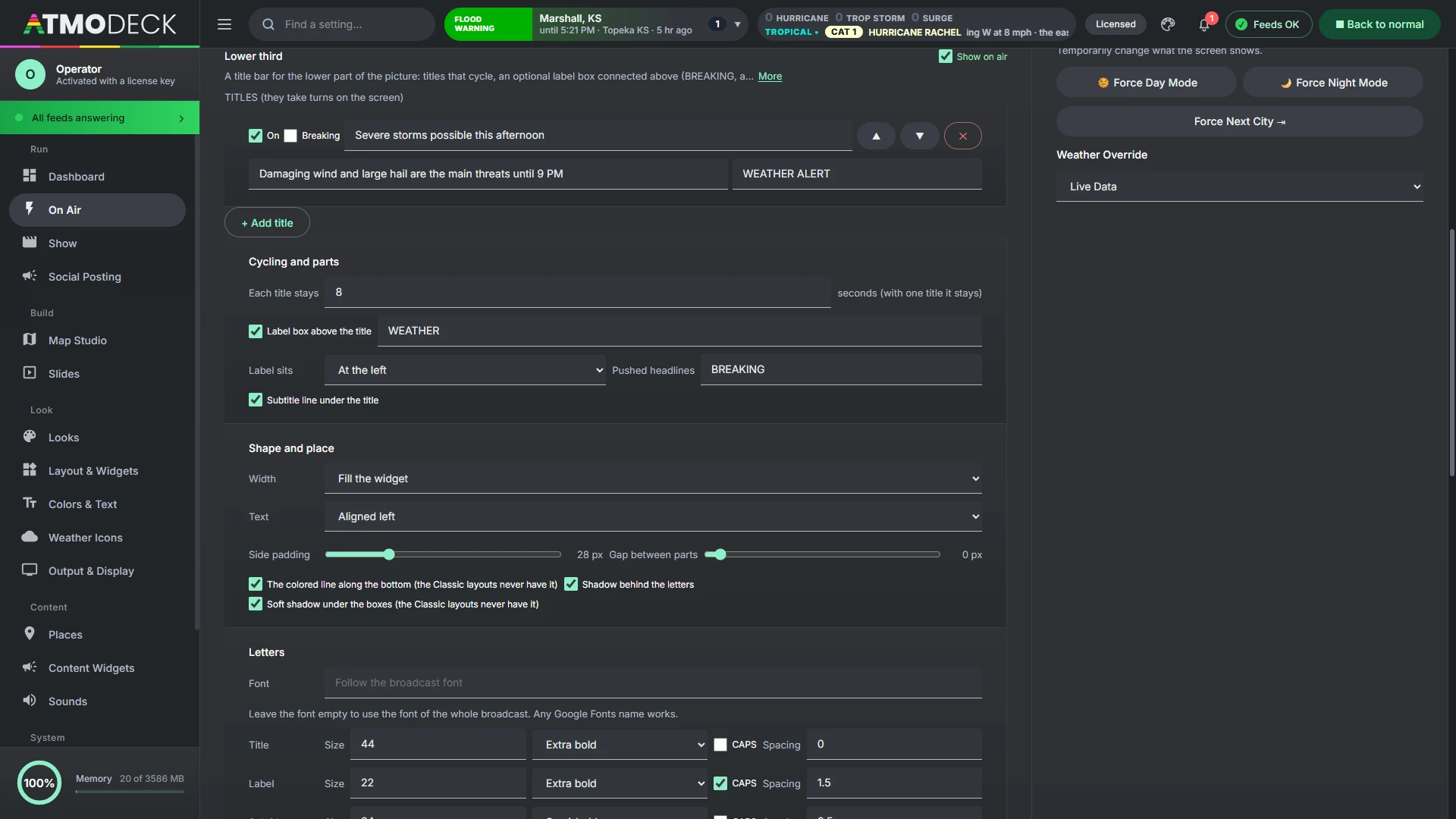
A title bar for the lower part of the picture, written and styled on the On Air page: cycling titles, an optional label box connected above, and an optional smaller subtitle line under it. It wears your layout style and theme colors unless you pick your own, and every part comes and goes with the animation you chose for layout changes.
- Up to 20 titles, each with its own subtitle and label, taking turns every few seconds
- When the title changes only the words change over; the boxes stay put, and a part that is added or removed comes and goes as a whole
- Any Google Font, sizes, weights, CAPS and spacing for the title, label and subtitle, and a color for each box, line and shadow, with how solid each box is down to fully transparent
- Push a headline from On Air to the ticker, the lower third, or both: on the lower third it covers all of it, subtitle too, in a breaking look of its own colors, and goes away when you press Clear
- Place and size it in Edit Mode like any widget; the Classic styles drop its shadows and bottom line, as the other panels do
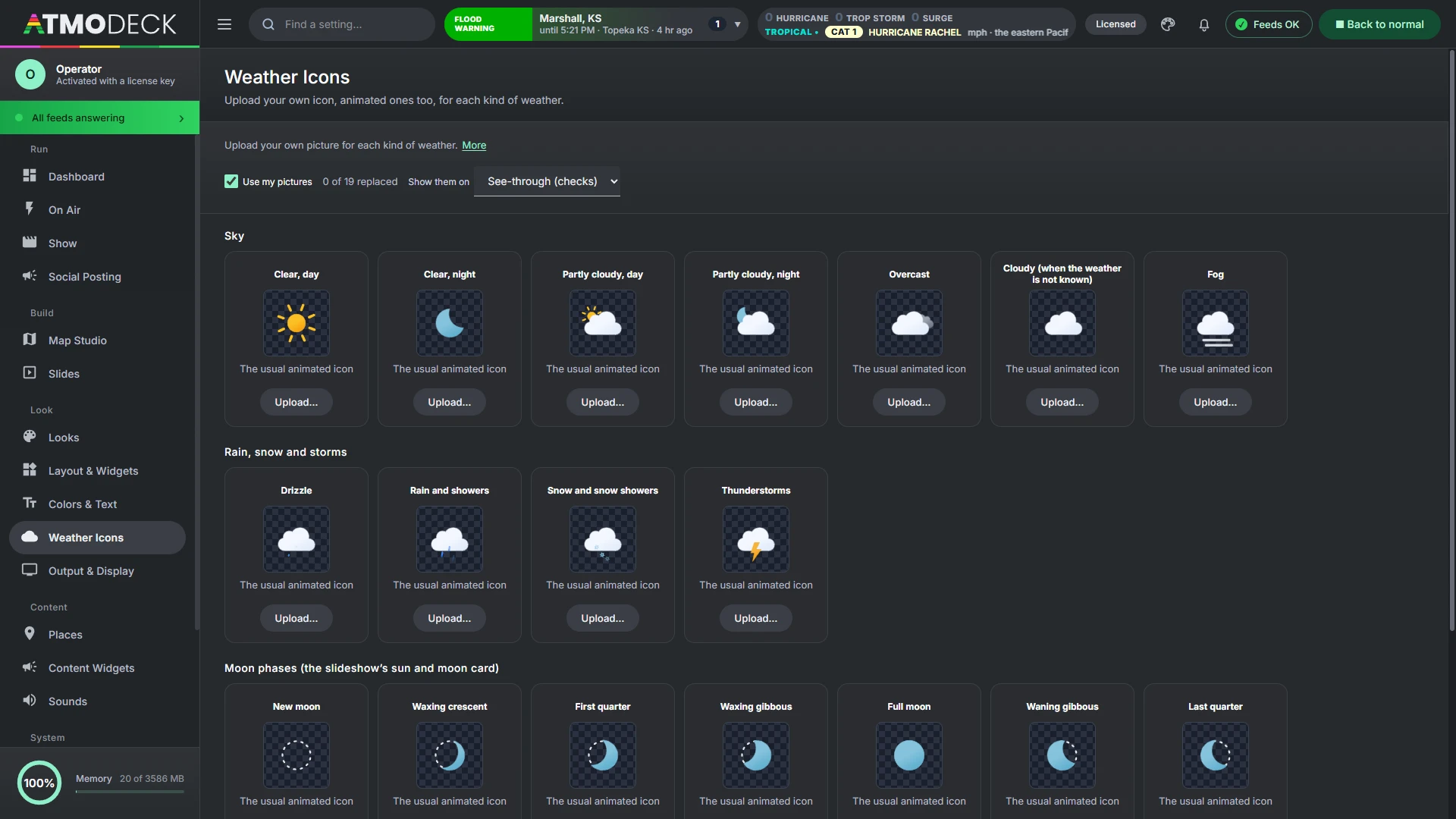
Your icons, animated if you like, everywhere.
The Weather Icons page has a card for each kind of weather: clear, partly cloudy, overcast, fog, drizzle, rain, snow, thunderstorms, day and night where it matters, and the eight moon phases. Upload a picture for any of them. PNG, GIF, WebP, AVIF, JPEG and SVG work, and animated GIF, PNG, WebP and SVG pictures move.
- Used on the bottom and hourly bars, in the slideshow, in the right-click forecast slides, on the map's weather icons and on the moon card
- A kind with no picture of its own keeps the usual animated icon, and your pictures can be switched off without deleting them
- Pictures stay on your computer; up to 3 MB each
Save the whole styling of the show, colors, logos, fonts, layout style, widget layout and map look, as a look and switch between looks in one click.
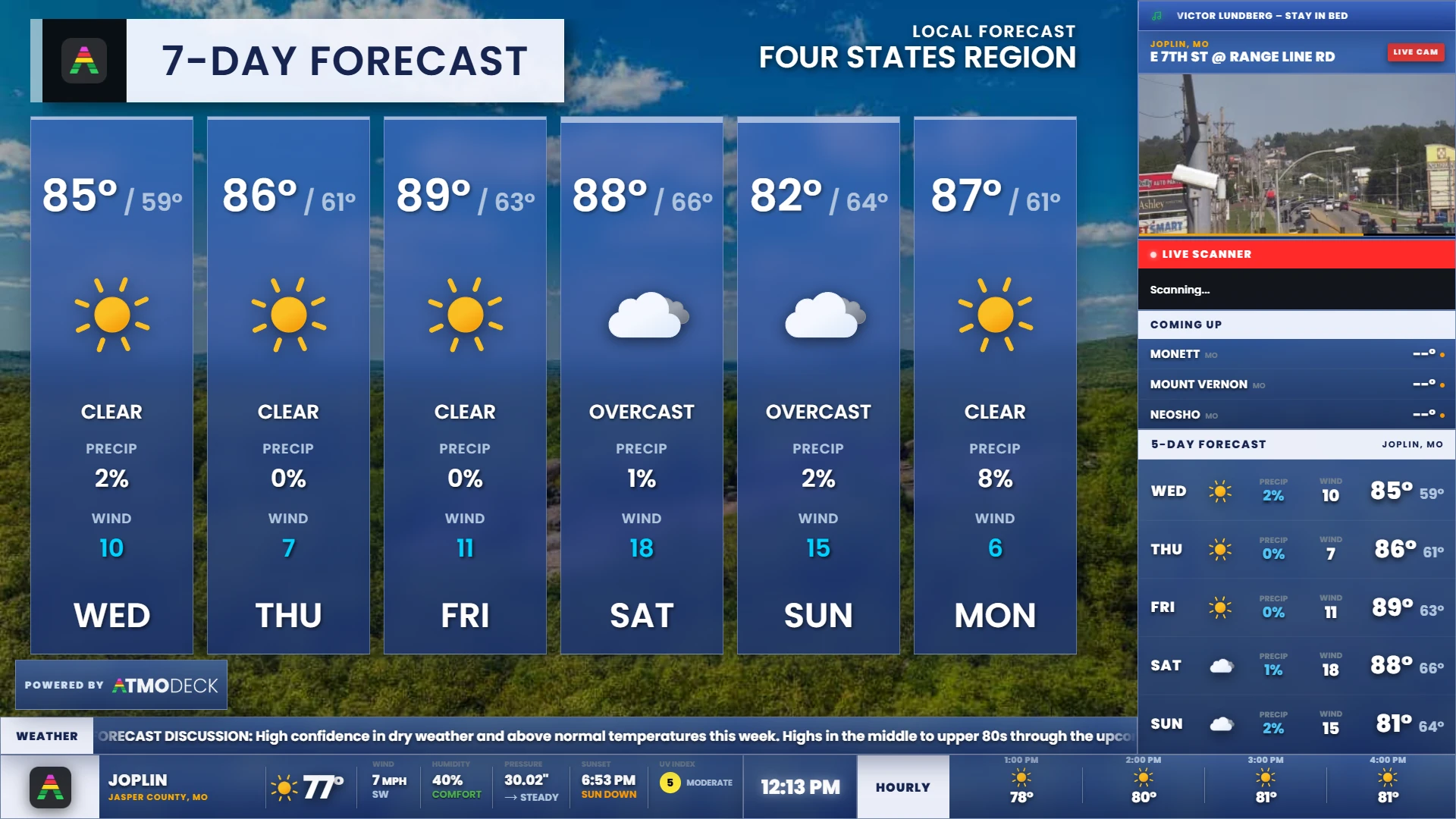
A full slideshow module and clips ready to post.
Morning, afternoon and evening rotations across a large slide library, plus a way to turn them into a standalone video for social media.
- 7-day and 3-day forecasts, current conditions, day planner, SPC outlook, air quality, marine and more
- Highway Travel from your own area: the interstates and US routes round you, with the weather along each
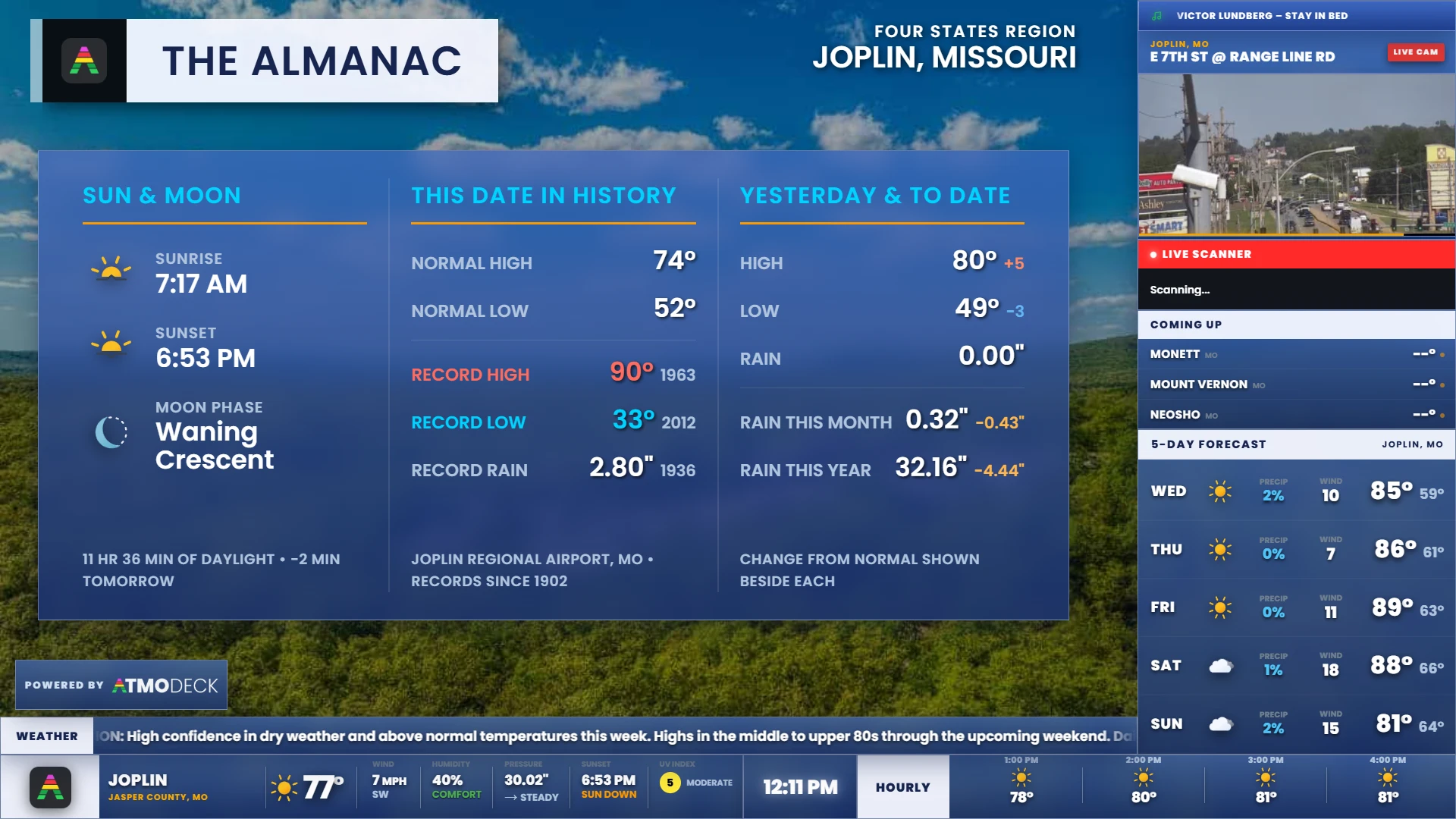
- An Almanac that fills itself in from the nearest NOAA climate station: normals, records with their years, yesterday and the rain to date
- Live camera slides mixed into the rotation
- Social clip export: build a "Your Weather Today" playlist and export an MP4 with crossfades and background music, without interrupting the live broadcast
- Intro media (video or image) to open your show
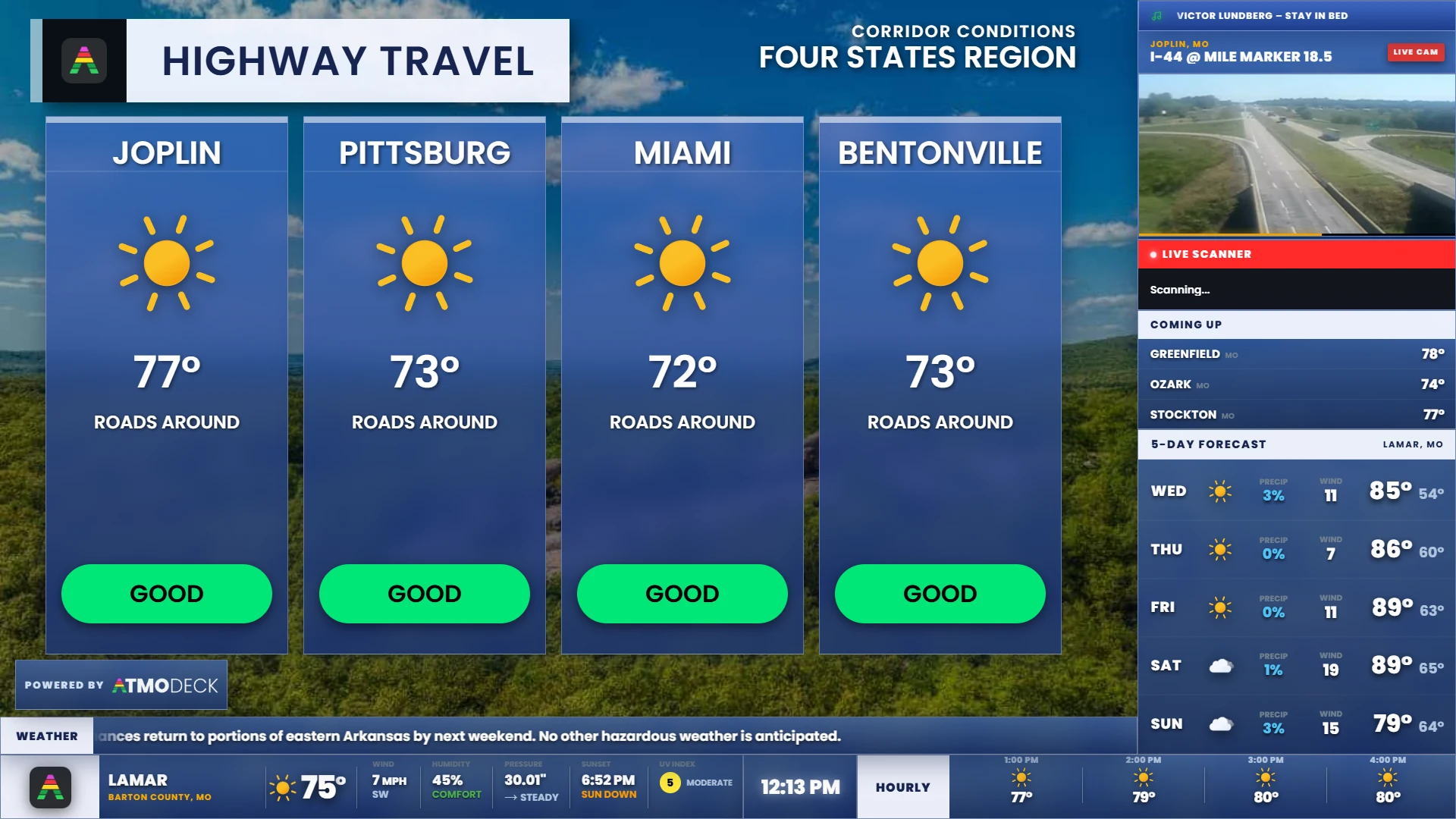
Your own slides, from a template or a blank page.
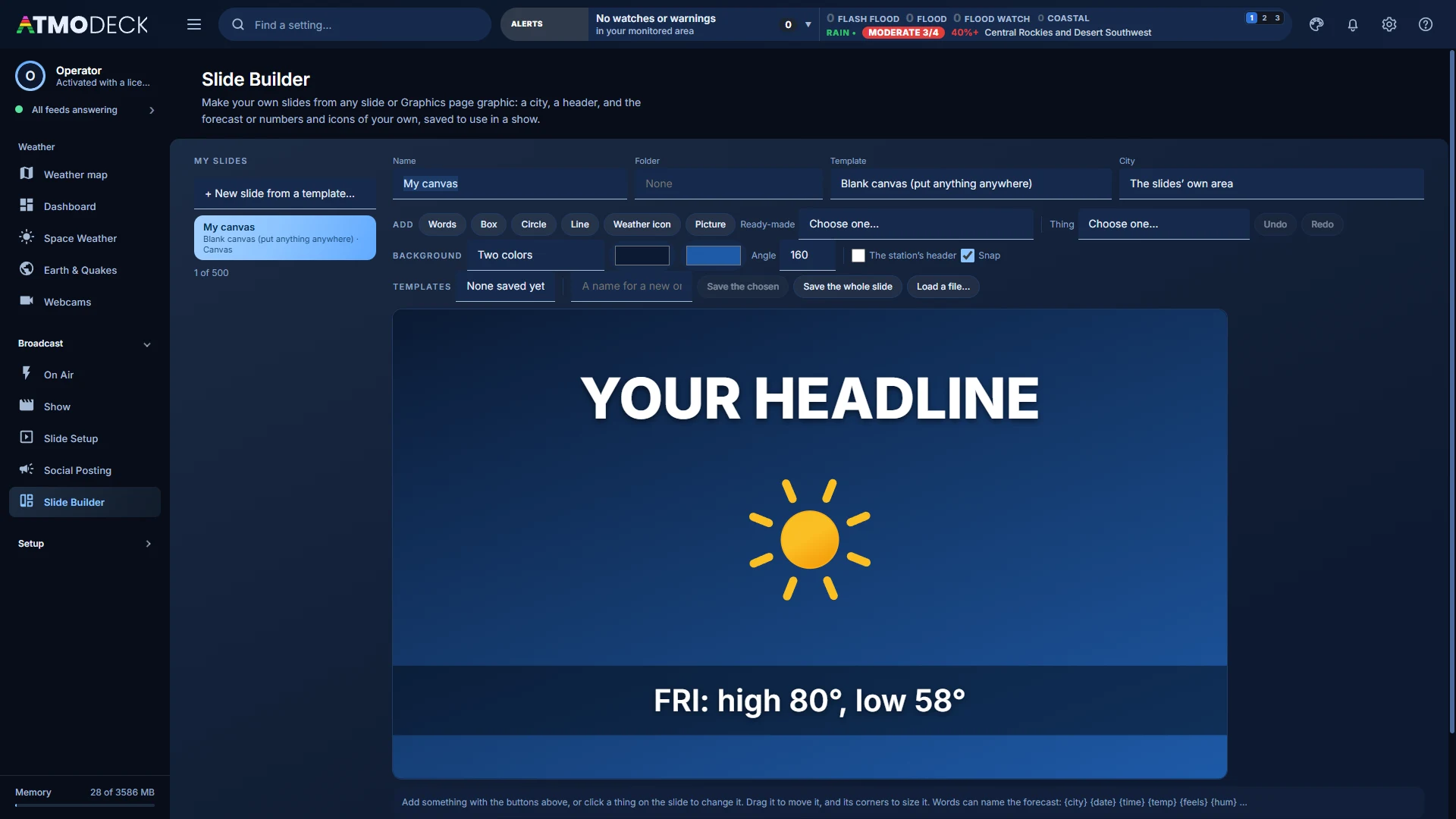
Start from any of the slideshow’s templates or a Graphics picture with your own name, city, title and numbers, from one of six empty layouts on your station’s background, or from a blank canvas.
- Words, boxes, circles, lines, weather icons and pictures anywhere, with fills, gradients, borders, shadows and a turn
- Ready-made pieces in your colors and font: the station’s header, one, three or seven forecast days, current conditions, a list of ten, your logo
- Words like {temp}, {hi1} and {day1} fill in with the city’s forecast each time the slide plays
- Any Google Fonts family, words that grow to fill their box, and a color dropper that takes a color from anywhere on the screen
- A station photo or a live camera behind the slide
- Save a piece or a whole slide as your own template, and take it to another computer
- Up to 500 slides in folders, in every playlist and show
Pictures of today’s weather, ready to post.
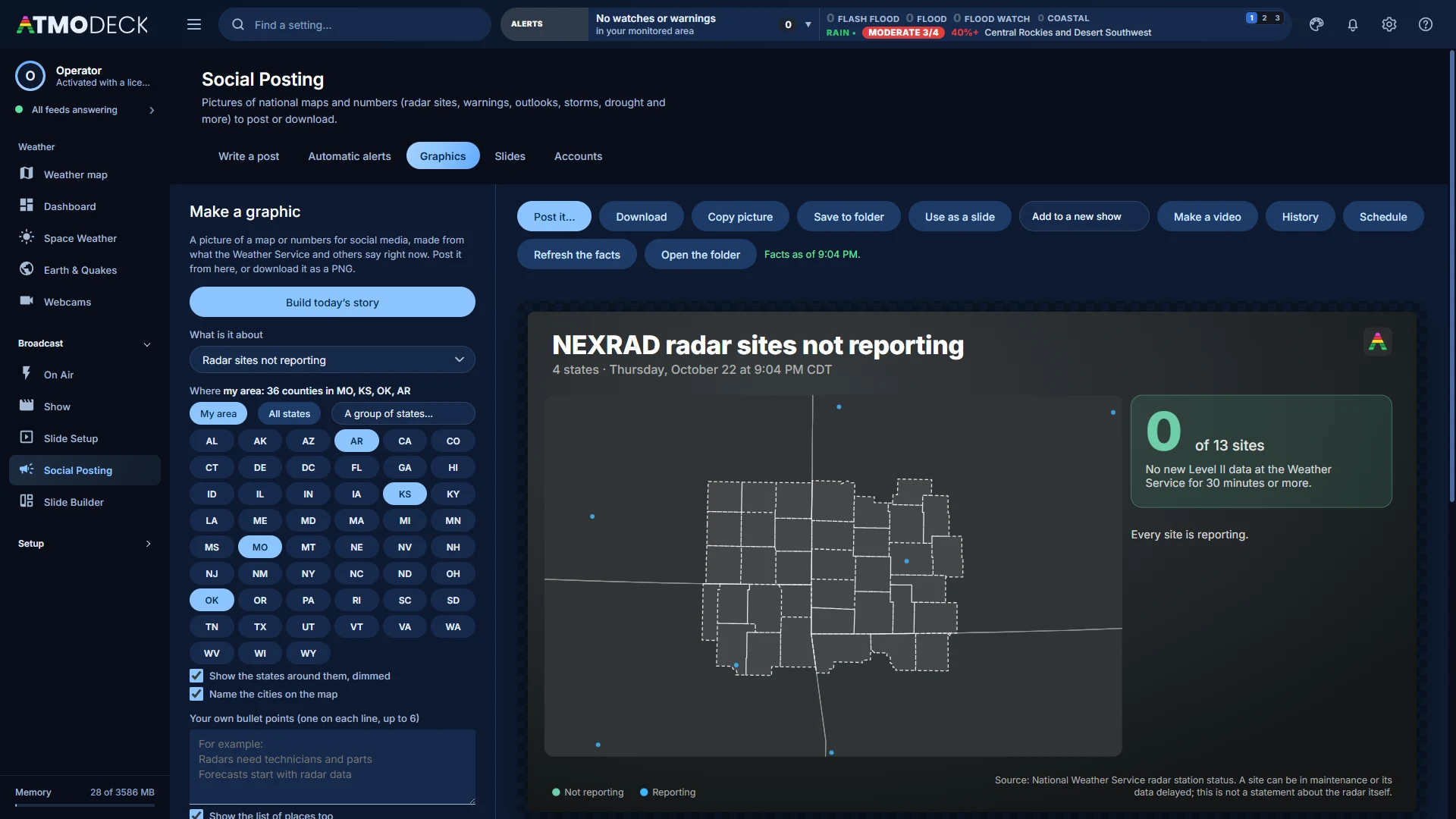
The Graphics page makes pictures for social media of your own area in your own colors: the outlooks, the Day 1 to 3 chances, the weather map with its fronts, a storm recap, a scorecard of yesterday’s forecast, the Sun and its flares, the Moon and more.
- Build today’s story picks the three or four pictures that fit the day and joins them to the show
- Make a video turns a picture into a short MP4 that builds up
- History keeps 30 days of pictures, and sets one beside the same picture made now as a before and after
- Schedule posts a picture by itself at a time of day, and can ask you first
- Verification: yesterday’s warnings against the storm reports, and the forecast against what was measured
Run it from your phone, your chat, or your production software.
Set up on the Console's Automation page. All of it works without touching the PC.
OBS scene switching
AtmoDeck changes your OBS scene by itself, for example on a tornado warning (obs-websocket).
Twitch chat requests
Viewers type !weather and a city, and the answer goes on air. AtmoDeck only reads chat and never posts.
Discord and webhooks
Post tornado and severe warnings to a Discord channel, Slack, Zapier or any webhook, once each.
Scheduled actions
Switch layouts, toggle widgets or start rotations at set times.
Phone and Stream Deck
Change layouts, hide alerts, flip day and night, control slideshows, and cut the Output to any saved map slide. A secure link is available.
Watchdog and kiosk mode
A frozen output restarts itself and stale data refreshes. Kiosk mode and Start with Windows suit always-on weather screens.
Your cameras, your scanner, your counties.
Any-link cameras
YouTube, HLS streams, MP4, still images or plain web pages as camera feeds, rotated automatically, with location and title cards. Find public DOT webcams near you and add them in one click (Missouri, Colorado, Iowa and California built in).
Live scanner audio
Pipe in a scanner feed with an animated on-air indicator; the text bar fills red during a transmission. Point the scanner and now-playing readouts at any text file. Needs an SDR dongle and scanning software to capture the audio.
Setup wizard
Type a US city or ZIP, or a Canadian city and province, and it finds your counties or forecast zones, towns and alert sources for you.
County and zone driven
Alerts, maps, reports and forecasts all follow the counties (US) or forecast zones (Canada) you choose, so the whole deck stays local.
Canada support
Environment and Climate Change Canada alerts and rain or snow radar, forecast zones in place of counties, and chasing across the border. A few US-only widgets are not available there yet.
Units and language
Celsius, km/h and hPa, and a Spanish interface option. Choosing Canada switches to metric for you. The current town in the bottom bar shrinks to fit, so long names are never cut off.
Tools for making the show pay for itself.
Sponsor logos and cards
Rotate sponsor logos and text cards on air, with QR and social widgets for calls to action.
Sponsor on-air report
Log how long each sponsor logo and card was on air, by day, and export a CSV or PDF as proof of airtime.
As-run log
What went on air and when: map changes, shows, steps of the run of show, layouts, slideshows and archive replays. It survives a restart and exports as a CSV from Status and Health, like the sponsor report.
Closings and delays
A ready-made widget for school and business closings, as a paged list or a scrolling ticker.
Custom data widgets
Show any JSON or RSS address, like a local scoreboard or your own feed, in a widget styled to match.
Countdown and world clock
Count down to a show, storm or event, or show times in cities around the world.
Referral program
Every customer gets a referral link. Friends start their own free trial through it.
Set up fast, stay up to date, keep it running.
Getting started
A setup wizard and a short getting-started checklist take you from install to on air, with a What's New box after each update.
Auto-update
New versions download and install themselves. You choose when to restart.
Backup and restore
AtmoDeck keeps its own dated copies of your setup outside the browser profile and puts them back if it loses its own. Save everything (settings, slideshow playlists, map slides, layouts, logos and cameras) to a file and restore it on another PC.
Error reports, only if you want them
Switch on Error reports under Status & Health and AtmoDeck tells us what goes wrong inside it, so a problem is fixed before you have to write. Your name, emails, keys, settings and places are never in it, and Show what would be sent displays the exact report first.
Built to be safe
Every window is sandboxed, the pages carry a Content-Security-Policy, the program’s own code is scrambled and compiled to bytecode, and the installer checks itself against tampering. The weather icons are inside the program, so nothing depends on a web service being up.
Status and diagnostics
One page shows every data feed, the weather source, updates and the watchdog, with a row of on-air lights for the radar, the model run, alerts, weather, internet and the output window itself. One click gathers a report for support.
OBS, vMix and capture cards
The output is a transparent 1920x1080 window (or 1080x1920 vertical), ready for window capture in OBS, vMix or a capture card. An output stream (a page for an OBS browser source and a Motion JPEG stream for vMix) sends it to other programs and computers.
WeatherAPI.com for the weather
Add a WeatherAPI.com key and AtmoDeck asks it first for conditions, forecasts, air quality and the map's weather icons, then Open-Meteo, then the Weather Service. $7 per month for 3 million calls. Details
Free public data
National Weather Service, Environment Canada, NOAA, NASA, USGS, NIFC, Iowa State IEM, ORNL outage data, Open-Meteo and more. No keys needed. Details
See it on your own machine.
Start a 7-day free trial and you're broadcasting today. Every broadcast feature is included in Solo, Standard and Pro; Solo, Standard and Pro differ by machine count.